
Introduction :
In today’s digital world, security is extremely important. Using strong and unique passwords is one of the best ways to protect personal accounts and sensitive data. However, creating secure passwords manually can be difficult and time-consuming.
In this tutorial, we will build a Password Generator using HTML, CSS, and JavaScript. This tool will help users generate strong and random passwords instantly based on different criteria.
A password generator is a practical real-world project that demonstrates how JavaScript can be used to create dynamic and useful web applications. By completing this project, you will learn how to handle user input, generate random values, and update content dynamically on the webpage.
This project is beginner-friendly and highly useful for improving both JavaScript logic and frontend development skills.

Tools & Resources That Support My Web Development Work
Discover the exact hardware and services I use daily — from laptops and keyboards to hosting and domains.
Project Overview :
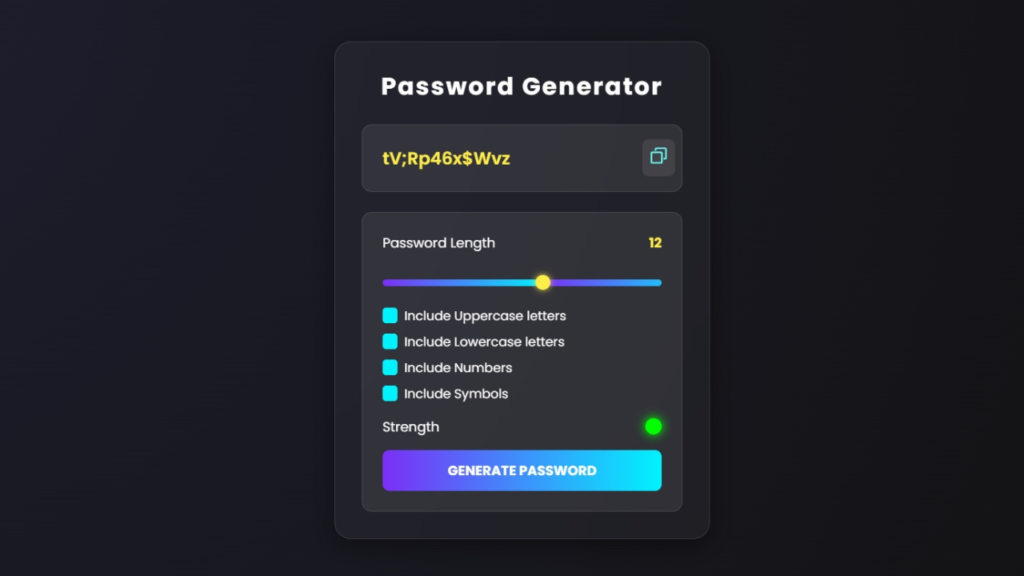
The goal of this project is to create a web-based tool that generates secure and random passwords based on user preferences.
The password generator will include features such as:
- Selecting password length
- Including uppercase and lowercase letters
- Adding numbers
- Including special characters
- Generating a strong random password
- Copy to clipboard functionality
When the user clicks the generate button, JavaScript will create a random password based on the selected options and display it instantly.
This project is widely used in real-world applications and is a great addition to any developer’s portfolio.
Video Tutorial :
You can watch the complete step-by-step tutorial below to understand how to build the password generator from scratch.
HTML Structure :
The first step is creating the structure of the password generator using HTML. This includes input fields, checkboxes, buttons, and a display area for the generated password.
In this section, we design a user-friendly interface where users can easily select options and generate passwords.
The HTML layout typically includes:
- A container for the generator
- Input field to display the password
- Options for selecting password criteria
- Generate button
- Copy button
This structured layout helps organize the elements and makes the application easy to use.
					<!doctype html>
<html lang="en">
    <head>
        <meta charset="UTF-8" />
        <meta name="viewport" content="width=device-width, initial-scale=1.0" />
        <title>Password Generator | CodeByGaurav</title>
        <link rel="stylesheet" href="style.css" />
    </head>
    <body>
        <!-- Wrapper -->
        <div class="container">
            <!-- Heading -->
            <h1>Password Generator</h1>

            <!-- Input div where password display -->
            <div class="display-container">
                <!-- Input -->
                <input
                    type="text"
                    readonly
                    placeholder="Password"
                    class="Display"
                    data-passwordDisplay
                />

                <!-- copy wala button -->
                <!-- on click text show copied -->
                <button class="copyBtn" data-copy>
                    <span class="copy-tooltip" data-copyMsg></span>
                    <!-- Copywala img -->
                    <img decoding="async"
                        src="assets/copy.svg"
                        alt="copy"
                        height="23"
                        width="23"
                    />
                </button>
            </div>

            <!-- input wali field where you set password checkbox -->
            <div class="input-container">
                <!-- password length heading and number which keep changing -->
                <div class="length-container">
                    <p>Password Length</p>
                    <p data-lengthNumber>5</p>
                </div>

                <!-- ek slider bnana hai -->
                <input
                    type="range"
                    min="1"
                    max="20"
                    step="1"
                    class="slider"
                    data-lengthSlider
                />

                <!-- check boxes div -->
                <div class="checkboxgroup">
                    <div class="check">
                        <input type="checkbox" id="uppercase" />
                        <label for="uppercase">Include Uppercase letters</label>
                    </div>
                    <div class="check">
                        <input type="checkbox" id="lowercase" />
                        <label for="uppercase">Include Lowercase letters</label>
                    </div>
                    <div class="check">
                        <input type="checkbox" id="numbers" />
                        <label for="uppercase">Include Numbers</label>
                    </div>
                    <div class="check">
                        <input type="checkbox" id="symbols" />
                        <label for="uppercase">Include Symbols</label>
                    </div>
                </div>

                <!-- strength wala -->
                <div class="strengthcontainer">
                    <p>Strength</p>
                    <div class="indicator" dataindicator></div>
                </div>

                <!-- Generate passowrd button -->
                 <button class="generateButton">Generate Password</button>
            </div>
        </div>
    </body>
    <script src="script.js"></script>
</html>
CSS Styling :
After creating the structure, we use CSS to style the password generator and make it visually appealing.
CSS is used to improve the layout, spacing, colors, and overall design of the interface. A clean UI helps users interact with the application more effectively.
Key styling techniques include:
- Centering the layout
- Styling buttons and inputs
- Adding hover effects
- Creating a modern UI design
- Making the layout responsive
These styles ensure that the password generator looks good on both desktop and mobile devices.
					@import url("https://fonts.googleapis.com/css2?family=Poppins:ital,wght@0,100;0,200;0,300;0,400;0,500;0,600;0,700;0,800;0,900;1,100;1,200;1,300;1,400;1,500;1,600;1,700;1,800;1,900&display=swap");

*,
*::before,
*::after {
    margin: 0;
    padding: 0;
    box-sizing: border-box;
    font-family: "Poppins", sans-serif;
}

:root {
    --dk-violet: rgba(15, 15, 30, 0.7);
    --lt-violet: rgba(255, 255, 255, 0.08);
    --vb-violet: #7b2ff7;
    --vb-yellow: #ffed4a;
    --vb-cyan: #00f2fe;
    --pl-white: #ffffff;
}

body {
    width: 100vw;
    height: 100vh;
    background: radial-gradient(circle at top left, #1e1e2f, #121212);
    display: flex;
    justify-content: center;
    align-items: center;
    overflow: hidden;
}

/* Glassmorphism Container */
.container {
    width: 90%;
    max-width: 450px;
    background: rgba(255, 255, 255, 0.04);
    backdrop-filter: blur(20px);
    border-radius: 20px;
    padding: 2rem;
    box-shadow: 0 8px 32px rgba(0, 0, 0, 0.4);
    border: 1px solid rgba(255, 255, 255, 0.1);
}

/* Heading */
h1 {
    color: var(--pl-white);
    text-align: center;
    font-size: 1.8rem;
    font-weight: bold;
    margin-bottom: 1.5rem;
    letter-spacing: 2px;
}

/* Display area */
.display-container {
    position: relative;
    background: var(--lt-violet);
    border-radius: 12px;
    padding: 0.5rem;
    border: 1px solid rgba(255, 255, 255, 0.1);
    display: flex;
    align-items: center;
}

.Display {
    width: 100%;
    background: transparent;
    border: none;
    outline: none;
    padding: 1rem;
    color: var(--vb-yellow);
    font-weight: 600;
    font-size: 1.3rem;
}

.Display::placeholder {
    color: rgba(255, 255, 255, 0.5);
}

.copyBtn {
    background: rgba(255, 255, 255, 0.08);
    border: none;
    padding: 0.5rem;
    border-radius: 8px;
    cursor: pointer;
    transition: all 0.3s ease;
}

.copyBtn:hover{
    background: var(--vb-violet);
    box-shadow: 0 0 10px var(--vb-violet);
}

/* tooltip */
.copy-tooltip{
    position: absolute;
    background: var(--vb-violet);
    color: var(--pl-white);
    font-size: 0.8rem;
    padding: 4px 8px;
    border-radius: 8px;
    top: -35px;
    right: 10px;
    opacity: 0;
    transform: scale(0);
    transition: all 0.25s ease-in-out;
}

.copy-tooltip.active{
    opacity: 1;
    transform: scale(1);
}

/* Input section */
.input-container{
    margin-top: 1.5rem;
    padding: 1.5rem;
    background: var(--lt-violet);
    border-radius: 12px;
    border: 1px solid rgba(255, 255, 255, 0.1);
}

/* Password length */
.length-container{
    display: flex;
    justify-content: space-between;
    align-items: center;
    color: var(--pl-white);
    margin-bottom: 1rem;
}

.length-container p:nth-child(2){
    color: var(--vb-yellow);
    font-weight: bold;
}
/* slider */
.slider{
    appearance: none;
    width: 100%;
    height: 0.5rem;
    background: linear-gradient(90deg, var(--vb-violet), var(--vb-cyan));
    border-radius: 8px;
    outline: none;
    margin: 1rem 0;
}

.slider::-webkit-slider-thumb{
    appearance: none;
    width: 18px;
    height: 18px;
    background: var(--vb-yellow);
    border-radius: 50%;
    cursor: pointer;
    box-shadow: 0 0 8px var(--vb-yellow);
    transition: all 0.3s ease;
}

.slider::-webkit-slider-thumb:hover{
    background: var(--vb-cyan);
    box-shadow: 0 0 12px var(--vb-cyan);
}

/* checlboxes */
.check{
    display: flex;
    align-items: center;
    gap: 0.5rem;
    margin: 0.5rem 0;
}

.check input{
    appearance: none;
    width: 18px;
    height: 18px;
    border: 2px solid var(--vb-cyan);
    border-radius: 4px;
    cursor: pointer;
    transition: all 0.3s ease;
}

.check input:checked{
    background: var(--vb-cyan);
}

.check label{
    color: var(--pl-white);
    font-size: 0.95rem;
}

/* Strength indicator */
.strengthcontainer{
    display: flex;
    justify-content: space-between;
    align-items: center;
    margin-top: 1rem;
    color: var(--pl-white);
}

.indicator{
    width: 20px;
    height: 20px;
    border-radius: 50%;
}

/* Generate button */
.generateButton{
    width: 100%;
    padding: 0.8rem;
    background: linear-gradient(90deg, var(--vb-violet), var(--vb-cyan));
    border: none;
    border-radius: 8px;
    color: var(--pl-white);
    font-size: 1rem;
    font-weight: bold;
    cursor: pointer;
    text-transform: uppercase;
    margin-top: 1rem;
    transition: all 0.3s ease;
}

.generateButton:hover{
    box-shadow: 0 0 12px var(--vb-cyan);
}
JavaScript Logic :
JavaScript is the core part of this project as it handles the password generation logic.
The process begins by collecting user preferences such as password length and selected character types. Based on these inputs, JavaScript generates a random password using a combination of characters.
The logic works as follows:
- Define character sets such as uppercase letters, lowercase letters, numbers, and symbols.
- Check which options are selected by the user.
- Combine the selected character sets.
- Generate a random password by picking characters from the combined set.
- Display the generated password in the output field.
Additionally, JavaScript can be used to implement a copy to clipboard feature, allowing users to copy the generated password instantly.
This project helps you understand how randomization and DOM manipulation work in JavaScript.
					const inputslider = document.querySelector("[data-lengthSlider]");
const lengthDisplay = document.querySelector("[data-lengthNumber]");

const paswwordDisplay = document.querySelector("[data-passwordDisplay]");
const copyBtn = document.querySelector("[data-copy]");
const copyMsg = document.querySelector("[data-copyMsg]");
const upperCaseCheck = document.querySelector("#uppercase");
const lowerCaseCheck = document.querySelector("#lowercase");
const numberCheck = document.querySelector("#numbers");
const symbolCheck = document.querySelector("#symbols");
const indicator = document.querySelector("[dataindicator]");
const generateBtn = document.querySelector(".generateButton");
const allCheckBox = document.querySelectorAll("input[type=checkbox]");
const symbols = '~`!@#$%^&*()_-+={[}]|:;"<,>.?/';
//starting ma password kya hai
//starting ma password length 10 man rha hu
//starting ma uppercase checkboc ko tick krkr de rha hai
//strting ma indicator grey
let password = "";
let passwordLength = 10;
let checkCountor = 0;
handleslider();
//str strength color to grey
setindicator("#ccc");

//set passwordLength
//jo slider aaga picha kroge us mutabik password length set kr dega
//paswordlength ko ui pa reflect krata hai
function handleslider() {
  inputslider.value = passwordLength;
  //jo length hai woh starting ma 10 ho
  lengthDisplay.innerText = passwordLength;
  //or kuch bhi krna chaiya
  const min = inputslider.min;
  const max = inputslider.max;

  inputslider.style.backgroundSize =
    ((passwordLength - min) * 100) / (max - min) + "%100%";
}

//color set
//shadow set

function setindicator(color) {
  indicator.style.backgroundColor = color;
  //shadow khud
  indicator.style.boxShadow = `0px 0px 12px 1px ${color} `;
}

//min aur max ka bich ma ek random integer findout krkr deta hai

function getRandomInteger(min, max) {
  //ab anser o to max -min ka bich ma aagya
  return Math.floor(Math.random() * (max - min)) + min;
}

function generateRandomInteger() {
  return getRandomInteger(0, 9);
}
function generateLowerCase() {
  //a assci value 97 and z have ascii value 123
  return String.fromCharCode(getRandomInteger(97, 123));
}

function generateUpperCase() {
  //A assci value 65 and z have ascii value 91
  return String.fromCharCode(getRandomInteger(65, 91));
}

//symbol ki string sa randomly index pkdkr uss index pa jo symbol pda hai woh deta hai
function generateSymbols() {
  //string len find in order to find max
  const randNum = getRandomInteger(0, symbols.length);

  return symbols[randNum];
}

//to calulate stength of password on basis of some rules
//kon konsa checkbox checked hai kon sa nhi hai
//indicator ma color set krdeta hai
function calculateStrength() {
  let hasupper = false;
  let haslower = false;
  let hasNum = false;
  let hasSymbol = false;

  if (upperCaseCheck.checked) {
    hasupper = true;
  }
  if (lowerCaseCheck.checked) {
    haslower = true;
  }
  if (numberCheck.checked) {
    hasNum = true;
  }
  if (symbolCheck.checked) {
    hasSymbol = true;
  }

  if (hasupper && haslower && (hasNum || hasSymbol) && passwordLength >= 8) {
    setindicator("#0f0");
  } else if (
    (haslower || hasupper) &&
    (hasNum || hasSymbol) &&
    passwordLength >= 6
  ) {
    setindicator("#ff0");
  } else {
    setindicator("#f00");
  }
}

//clipboard api
//async function
//jo bhi content password display ki field ka andar ussa clipboard pa copy krta hai
//write text method jo promise return krta haiclipboard
async function copyContent() {
  //promise resolve or reject dono ho skta hai so we give in try and catch block
  //copy msg invisible ho gya kuch time ka bad
  try {
    await navigator.clipboard.writeText(paswwordDisplay.value);
    copyMsg.innerText = "Copied";
  } catch (error) {
    copyMsg.innerText = "Failed";
  }
  //to make copy wala span visible

  copyMsg.classList.add("active");

  //copy wala text ko gyab krne ka liye

  setTimeout(() => {
    copyMsg.classList.remove("active");
  }, 2000);
}

//to add event listener
//slider ko jb bhi aag picha kr raha hun to slider ki avlue change ho rhi yeh woh value lakar de rha hai
inputslider.addEventListener("input", (e) => {
  //pasword length ko updat kr diya
  passwordLength = e.target.value;

  handleslider();
});

//copy btn add event listener
//input value koi value hogi tb copy kr payoge
copyBtn.addEventListener("click", () => {
  if (paswwordDisplay.value) {
    copyContent();
  }
});

function handleCheckBoxChange() {
  checkCountor = 0;
  allCheckBox.forEach((checkbox) => {
    if (checkbox.checked) {
      checkCountor++;
    }
  });

  //special condition of password length< no of checkbocx count
  if (passwordLength < checkCountor) {
    passwordLength = checkCountor;
    handleslider();
  }
}
//saara checkbocx pa even listener lga denga
//chahe tick ho ho rha ya untick usma check krkr aao kitna checkbox cheked hai
allCheckBox.forEach((checkbox) => {
  checkbox.addEventListener("change", handleCheckBoxChange);
});

//to genrate a shuffle paswword
function shufflePassword(array) {
  //Fisher Yates Method
  for (let i = array.length - 1; i > 0; i--) {
    //random J, find out using random function
    const j = Math.floor(Math.random() * (i + 1));
    //swap number at i index and j index
    const temp = array[i];
    array[i] = array[j];
    array[j] = temp;
  }
  let str = "";
  array.forEach((el) => (str += el));
  return str;
}
//generate password
//jb mai sare boxes ko unchecked kr deta hu then click krta hu genertae password
//then generate password nhi hota

generateBtn.addEventListener("click", () => {
  //koi bhi checkbox ticked nhi hai to hum password generate nhi kr sakta
  if (checkCountor == 0) {
    return;
  }

  if (passwordLength < checkCountor) {
    passwordLength = checkCountor;
    handleslider();
  }

  // console.log("stating the journey");

  //lets start to journey to find new password

  //remove old password
  password = "";
  //check kru ki password ma kon si chiza dalni hai means konsa checkbox checked hai
  //lets put the stuff mentioned by checkbox
  //   if (upperCaseCheck.checked) {
  //     password += generateUpperCase();
  //   }
  //   if (lowerCaseCheck.checked) {
  //     password += generateLowerCase();
  //   }
  //   if (numberCheck.checked) {
  //     password += generateRandomInteger();
  //   }
  //   if (symbolCheck.checked) {
  //     password += generateSymbols();
  //   }
  //suppose 10 paswwword length this 4 chize upar wali daldi
  // aur no randomly dal dun
  //lekin yeh kaisa findout karu ki no dalu , symbol , ya letter

  let funcArr = [];
  if (upperCaseCheck.checked) {
    funcArr.push(generateUpperCase);
  }
  if (lowerCaseCheck.checked) {
    funcArr.push(generateLowerCase);
  }
  if (numberCheck.checked) {
    funcArr.push(generateRandomInteger);
  }
  if (symbolCheck.checked) {
    funcArr.push(generateSymbols);
  }
  //is function ma sari chiz daldi jo bhi chceked hai

  //compulsory addition
  //jo tick kiya hu

  for (let i = 0; i < funcArr.length; i++) {
    password += funcArr[i]();
  }
  // console.log("Compulsory addition done");

  //remaining addition

  for (let i = 0; i < passwordLength - funcArr.length; i++) {
    let randIndex = getRandomInteger(0, funcArr.length);

    password += funcArr[randIndex]();
  }
  // console.log("Remaining addition Done");

  //shuffle krna padega
  //pasword ko array ka frm ma bhje diya
  password = shufflePassword(Array.from(password));
  // console.log("Shuffling done");
  paswwordDisplay.value = password;
  // console.log("Ui addition done");
  //paswword bn ka bad strength bhi call krni padegi
  calculateStrength();
});
You Might Also Like :
If you enjoyed building this project, you may also like these tutorials:
These projects will help you improve your frontend development skills and build real-world UI components.
Features of This Project :
This Password Generator includes several useful features:
- Generates strong and random passwords
- Customizable password length
- Option to include letters, numbers, and symbols
- Copy to clipboard functionality
- Clean and user-friendly interface
- Beginner-friendly JavaScript logic
This project is highly practical and can be used in real-world applications.
Conclusion :
In this tutorial, we built a Password Generator using HTML, CSS, and JavaScript. This project demonstrated how JavaScript can be used to create useful and interactive web applications.
Password generators are important tools for improving online security. By customizing the features and design, you can create your own advanced version of this project.
Practicing real-world projects like this is one of the best ways to improve your frontend development skills and build a strong portfolio.

Pingback: Loading Animation using HTML & CSS (Modern UI Loader Design) - CodeByGaurav
Pingback: Glass Login Form using HTML & CSS (Modern Glassmorphism UI Design) - CodeByGaurav
Pingback: Login & Signup Form with Flip Animation using HTML CSS & JavaScript (Modern UI Design) - CodeByGaurav