
Introduction :
User interface design plays a crucial role in modern web development, and one of the most popular trends in recent years is Glassmorphism. This design style creates a frosted glass effect that gives websites a clean, elegant, and futuristic look.
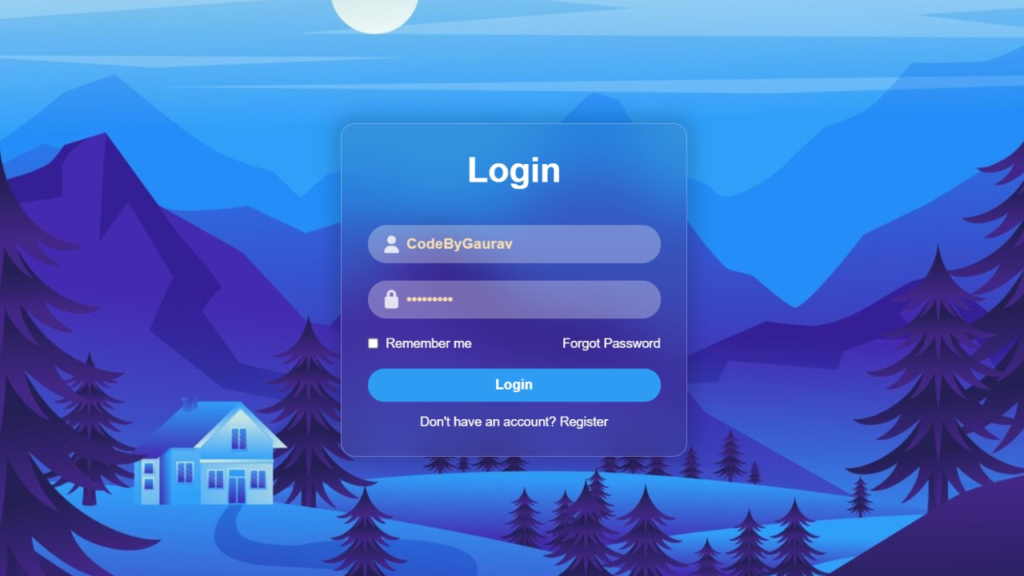
In this tutorial, we will build a Glass Login Form using HTML and CSS. This login form features a transparent background, soft blur effects, and subtle shadows that create a realistic glass-like appearance.
Glass login forms are widely used in modern websites, especially in dashboards, landing pages, and authentication systems. This project is perfect for beginners who want to learn advanced CSS styling techniques while building real-world UI components.
By the end of this tutorial, you will be able to design a modern login form that enhances both the visual appeal and user experience of your website.

Tools & Resources That Support My Web Development Work
Discover the exact hardware and services I use daily — from laptops and keyboards to hosting and domains.
Project Overview :
The goal of this project is to create a stylish login form that uses the glassmorphism design concept.
The login form will include:
- A centered glass-style container
- Username and password input fields
- Login button with modern styling
- Background blur and transparency effects
- Clean and minimal layout
The design focuses on simplicity and usability while maintaining a modern aesthetic. The glass effect is achieved using CSS properties like transparency, backdrop blur, borders, and shadows.
This project demonstrates how powerful CSS can be when it comes to creating visually appealing user interfaces without using JavaScript.
Video Tutorial :
You can watch the complete step-by-step tutorial below to understand how to build the glass login form from scratch.
HTML Structure :
The HTML structure provides the foundation of the login form.
In this section, we create a container that holds the form elements. Inside the form, we include input fields for the username and password, along with a login button.
The structure is designed to be simple and organized, ensuring that it is easy to style using CSS.
Key elements used in the HTML structure include:
- Main container for alignment
- Form element
- Input fields for user credentials
- Login button
A clean HTML structure helps maintain readability and improves scalability for future enhancements.
					<!DOCTYPE html>
<html lang="en">
<head>
    <meta charset="UTF-8">
    <meta name="viewport" content="width=device-width, initial-scale=1.0">
    <title>Login Form | CodeByGaurav</title>
    <link rel="stylesheet" href="style.css">
    <link rel="stylesheet" href="https://cdnjs.cloudflare.com/ajax/libs/font-awesome/7.0.1/css/all.min.css">
</head>
<body>
    <form action="" class="login-form">
        <h1 class="login-title">Login</h1>

        <div class="input-box">
            <i class="fa-solid fa-user"></i>
            <input type="text" placeholder="Username">
        </div>
        <div class="input-box">
            <i class="fa-solid fa-lock"></i>
            <input type="password" placeholder="Password">
        </div>

        <div class="remember-forgot-box">
            <label for="remember">
                <input type="checkbox" id="remember">
                Remember me
            </label>
            <a href="#">Forgot Password</a>
        </div>

        <button class="login-btn">Login</button>
        <p class="register">
            Don't have an account?
            <a href="#">Register</a>
        </p>
    </form>
</body>
</html>
CSS Styling :
CSS is the most important part of this project as it creates the glassmorphism effect.
The glass effect is achieved by combining multiple CSS properties that work together to simulate a frosted glass appearance.
Key styling techniques used include:
- Semi-transparent background using RGBA colors
- Blur effect using backdrop-filter
- Soft borders and rounded corners
- Subtle box shadows for depth
- Center alignment using flexbox
These techniques create a layered effect where the background appears blurred behind the login form, giving it a modern and elegant look.
You can also customize the design by changing colors, blur intensity, and spacing.
					*{
    padding: 0;
    margin: 0;
    box-sizing: border-box;
    font-family: sans-serif;
}

body{
    min-height: 100vh;
    display: flex;
    align-items: center;
    justify-content: center;
    background: url('./bg.jpg');
    background-size: cover;
    background-position: center;
}

.login-form{
    background: rgba(64, 64, 64, 0.15);
    border: 1px solid rgba(255, 255, 255, 0.3);
    padding: 30px;
    border-radius: 16px;
    backdrop-filter: blur(25px);
    text-align: center;
    color: white;
    width: 400px;
    box-shadow: 0 0 20px 10px rgba(0, 0, 0, 0.15);
}

.login-title{
    font-size: 40px;
    margin-bottom: 40px;
}

.input-box{
    margin: 20px 0;
    position: relative;
}

.input-box input{
    width: 100%;
    background: rgba(255, 255, 255, 0.3);
    border: none;
    padding: 12px 12px 12px 45px;
    border-radius: 99px;
    outline: 3px solid transparent;
    transition: 0.3s;
    font-size: 17px;
    color: wheat;
    font-weight: 600;
}

.input-box input::placeholder{
    color: rgba(255, 255, 255, 0.8);
    font-size: 17px;
    font-weight: 500;
}

.input-box input:focus{
    outline: 3px solid rgba(255, 255, 255, 0.3);
}

.input-box input::-ms-reveal{
    filter: invert(100%);
}

.input-box i{
    position: absolute;
    left: 15px;
    top: 50%;
    transform: translateY(-50%);
    font-size: 20px;
    color: rgba(255, 255, 255, 0.8);
}

.remember-forgot-box{
    display: flex;
    justify-content: space-between;
    margin: 20px 0;
    font-size: 15px;
}

.remember-forgot-box label{
    display: flex;
    gap: 8px;
    cursor: pointer;
}

.remember-forgot-box input{
    accent-color: white;
    cursor: pointer;
}

.remember-forgot-box a{
    color: white;
    text-decoration: none;
}

.remember-forgot-box a:hover{
    text-decoration: underline;
}

.login-btn{
    width: 100%;
    padding: 10px 0;
    background: #2f9cf4;
    border: none;
    border-radius: 99px;
    color: white;
    font-size: 16px;
    font-weight: 600;
    cursor: pointer;
    transition: 0.3s;
}

.login-btn:hover{
    background: #0b87ec;
}

.register{
    margin-top: 15px;
    font-size: 15px;
}

.register a{
    color: white;
    text-decoration: none;
    font-weight: 500;
}

.register a:hover{
    text-decoration: underline;
}
Project Images – Download Resources
To enhance the visual appearance of this project, we use high-quality images that improve the overall design and user experience. Using the right background and assets plays an important role, especially in modern UI designs like glassmorphism, neon effects, and animated interfaces.
For this project, you may need a few image resources to achieve the best result.
The image resources include:
- High-quality background image
- Gradient or abstract design background
- Optional UI preview screenshot
- Decorative elements (if used in design)
These resources help create a more professional and visually appealing final output.
You can download all the required project images from the links below:
👇 Download the images from here:
👉 Download Project Images (ZIP File)
👉 Get Images from GitHub Repository
You Might Also Like :
If you enjoyed building this project, you may also like these tutorials:
- Password Generator using JavaScript | Create Strong Random Password Generator (HTML CSS JS)
- Analog Clock Using JavaScript
These projects will help you improve your frontend development skills and build real-world UI components.
Glassmorphism Design Concept :
Glassmorphism is a UI design trend inspired by frosted glass surfaces. It uses transparency, blur, and layering to create depth and hierarchy in user interfaces.
The main characteristics of glassmorphism include:
- Transparent or translucent background
- Background blur effect
- Light borders to define edges
- Soft shadows for depth
- Minimal and clean design
This design style is widely used in modern applications because it provides a visually pleasing and professional appearance.
Learning glassmorphism helps developers create advanced UI designs using only CSS.
User Experience & Practical Use :
A well-designed login form is essential for user interaction and authentication systems.
This glass login form improves user experience by:
- Providing a clean and distraction-free layout
- Enhancing readability with proper contrast
- Offering a modern and attractive design
- Making the interface feel premium and interactive
This type of login form can be used in:
- Portfolio websites
- Admin dashboards
- SaaS applications
- Landing pages
Improving UI design directly impacts user engagement and retention.
Features of This Project :
This Glass Login Form project includes several useful features:
- Modern glassmorphism UI design
- Clean and minimal layout
- Smooth visual appearance
- Beginner-friendly HTML and CSS
- Lightweight and fast loading
- Fully customizable design
These features make the project ideal for real-world use.
Conclusion :
In this tutorial, we created a Glass Login Form using HTML and CSS. This project demonstrated how modern CSS techniques can be used to build visually attractive and professional UI components.
Glassmorphism design is a powerful trend that enhances the look and feel of web applications. By customizing the design and adding more features, you can create unique and interactive login forms for different types of websites.
Practicing such projects helps developers improve their frontend skills and build a strong portfolio.

Do you have any video of that? I’d want to find out
more details.
https://youtu.be/_0cRwaWRuCU
Pingback: Animated Login Form using HTML & CSS - CodeByGaurav
Pingback: Complete Guide to Responsive Web Design using HTML & CSS (Beginner to Advanced) - CodeByGaurav