

Tools & Resources That Support My Web Development Work
Discover the exact hardware and services I use daily — from laptops and keyboards to hosting and domains.
In modern websites and web applications, a Login and Signup Form is not just a basic feature — it plays a crucial role in user experience and engagement. A clean, interactive, and well-designed authentication form helps users trust your platform and stay connected.
In this blog post, we will build a Modern Login & Signup Form using HTML, CSS, and JavaScript. This project is perfect for beginners as well as developers who want to improve their frontend UI skills.
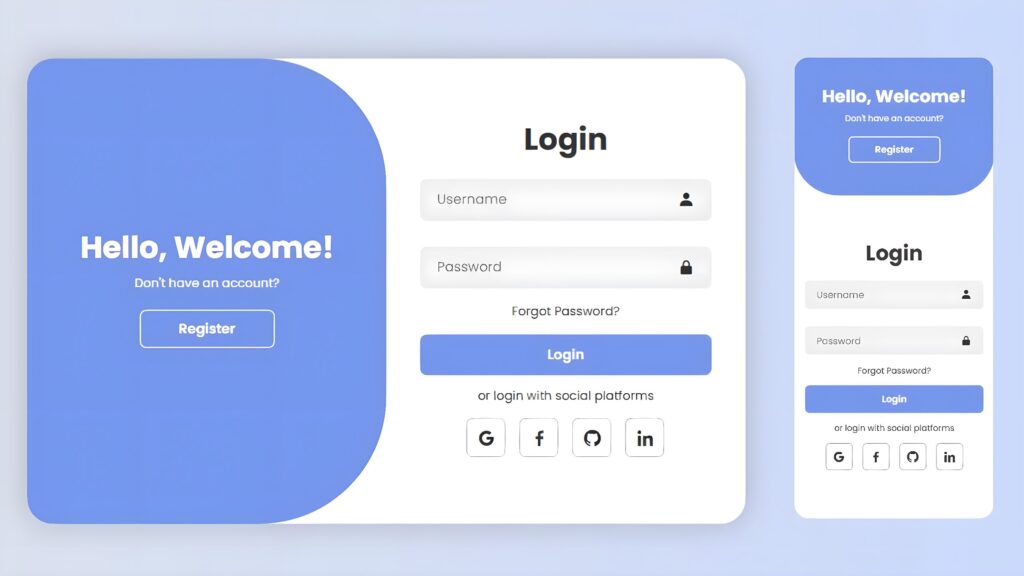
1. Video Tutorial – Login & Signup Form Using HTML, CSS & JavaScript
If you prefer learning visually, this project is also available as a step-by-step video tutorial.
In this tutorial, you’ll learn how to create a modern Login & Signup form using HTML, CSS, and JavaScript, including animations and responsive design techniques.
👉 Watch the full video tutorial below to understand the complete implementation.
2. HTML – Form Structure
HTML is used to create the basic structure of the Login and Signup forms.
In this project, HTML helps to:
Build the Login and Register sections
Define input fields and buttons
Create a clean and semantic layout
Structure the welcome panel content
The HTML code is clean, readable, and SEO-friendly.
					<!DOCTYPE html>
<html lang="en">
<head>
    <meta charset="UTF-8">
    <meta name="viewport" content="width=device-width, initial-scale=1.0">
    <title>Login/Signup Form</title>
    <link rel="stylesheet" href="SignUp_LogIn_Form.css">
    <link href='https://unpkg.com/boxicons@2.1.4/css/boxicons.min.css' rel='stylesheet'>
</head>
  <body>

    <!-- credits to the writter @leonam-silva-de-souza -->
      <div class="container">
          <div class="form-box login">
              <form action="#">
                  <h1>Login</h1>
                  <div class="input-box">
                      <input type="text" placeholder="Username" required>
                      <i class='bx bxs-user'></i>
                  </div>
                  <div class="input-box">
                      <input type="password" placeholder="Password" required>
                      <i class='bx bxs-lock-alt' ></i>
                  </div>
                  <div class="forgot-link">
                      <a href="#">Forgot Password?</a>
                  </div>
                  <button type="submit" class="btn">Login</button>
                  <p>or login with social platforms</p>
                  <div class="social-icons">
                      <a href="#"><i class='bx bxl-google' ></i></a>
                      <a href="#"><i class='bx bxl-facebook' ></i></a>
                      <a href="#"><i class='bx bxl-github' ></i></a>
                      <a href="#"><i class='bx bxl-linkedin' ></i></a>
                  </div>
              </form>
          </div>

          <div class="form-box register">
              <form action="#">
                  <h1>Registration</h1>
                  <div class="input-box">
                      <input type="text" placeholder="Username" required>
                      <i class='bx bxs-user'></i>
                  </div>
                  <div class="input-box">
                      <input type="email" placeholder="Email" required>
                      <i class='bx bxs-envelope' ></i>
                  </div>
                  <div class="input-box">
                      <input type="password" placeholder="Password" required>
                      <i class='bx bxs-lock-alt' ></i>
                  </div>
                  <button type="submit" class="btn">Register</button>
                  <p>or register with social platforms</p>
                  <div class="social-icons">
                      <a href="#"><i class='bx bxl-google' ></i></a>
                      <a href="#"><i class='bx bxl-facebook' ></i></a>
                      <a href="#"><i class='bx bxl-github' ></i></a>
                      <a href="#"><i class='bx bxl-linkedin' ></i></a>
                  </div>
              </form>
          </div>

          <div class="toggle-box">
              <div class="toggle-panel toggle-left">
                  <h1>Hello, Welcome!</h1>
                  <p>Don't have an account?</p>
                  <button class="btn register-btn">Register</button>
              </div>

              <div class="toggle-panel toggle-right">
                  <h1>Welcome Back!</h1>
                  <p>Already have an account?</p>
                  <button class="btn login-btn">Login</button>
              </div>
          </div>
      </div>

      <script src="SignUp_LogIn_Form.js"></script>
  </body>
</html>
3. CSS – Styling & Layout Design
CSS is responsible for giving this project a modern and professional look.
Using CSS, we:
Apply a soft and attractive color scheme
Add rounded corners and smooth shadows
Use Flexbox for layout alignment
Create hover and transition effects
Make the design responsive using media queries
					@import url("https://fonts.googleapis.com/css2?family=Poppins:ital,wght@0,100;0,200;0,300;0,400;0,500;0,600;0,700;0,800;0,900;1,100;1,200;1,300;1,400;1,500;1,600;1,700;1,800;1,900&display=swap");

* {
  margin: 0;
  padding: 0;
  box-sizing: border-box;
  font-family: "Poppins", sans-serif;
  text-decoration: none;
  list-style: none;
}

body {
  display: flex;
  justify-content: center;
  align-items: center;
  min-height: 100vh;
  background: linear-gradient(90deg, #e2e2e2, #c9d6ff);
}

.container {
  position: relative;
  width: 850px;
  height: 550px;
  background: #fff;
  margin: 20px;
  border-radius: 30px;
  box-shadow: 0 0 30px rgba(0, 0, 0, 0.2);
  overflow: hidden;
}

.container h1 {
  font-size: 36px;
  margin: -10px 0;
}

.container p {
  font-size: 14.5px;
  margin: 15px 0;
}

form {
  width: 100%;
}

.form-box {
  position: absolute;
  right: 0;
  width: 50%;
  height: 100%;
  background: #fff;
  display: flex;
  align-items: center;
  color: #333;
  text-align: center;
  padding: 40px;
  z-index: 1;
  transition: 0.6s ease-in-out 1.2s, visibility 0s 1s;
}

.container.active .form-box {
  right: 50%;
}

.form-box.register {
  visibility: hidden;
}
.container.active .form-box.register {
  visibility: visible;
}

.input-box {
  position: relative;
  margin: 30px 0;
}

.input-box input {
  width: 100%;
  padding: 13px 50px 13px 20px;
  background: #eee;
  border-radius: 8px;
  border: none;
  outline: none;
  font-size: 16px;
  color: #333;
  font-weight: 500;
}

.input-box input::placeholder {
  color: #888;
  font-weight: 400;
}

.input-box i {
  position: absolute;
  right: 20px;
  top: 50%;
  transform: translateY(-50%);
  font-size: 20px;
}

.forgot-link {
  margin: -15px 0 15px;
}
.forgot-link a {
  font-size: 14.5px;
  color: #333;
}

.btn {
  width: 100%;
  height: 48px;
  background: #7494ec;
  border-radius: 8px;
  box-shadow: 0 0 10px rgba(0, 0, 0, 0.1);
  border: none;
  cursor: pointer;
  font-size: 16px;
  color: #fff;
  font-weight: 600;
}

.social-icons {
  display: flex;
  justify-content: center;
}

.social-icons a {
  display: inline-flex;
  padding: 10px;
  border: 2px solid #ccc;
  border-radius: 8px;
  font-size: 24px;
  color: #333;
  margin: 0 8px;
}

.toggle-box {
  position: absolute;
  width: 100%;
  height: 100%;
}

.toggle-box::before {
  content: "";
  position: absolute;
  left: -250%;
  width: 300%;
  height: 100%;
  background: #7494ec;
  /* border: 2px solid red; */
  border-radius: 150px;
  z-index: 2;
  transition: 1.8s ease-in-out;
}

.container.active .toggle-box::before {
  left: 50%;
}

.toggle-panel {
  position: absolute;
  width: 50%;
  height: 100%;
  /* background: seagreen; */
  color: #fff;
  display: flex;
  flex-direction: column;
  justify-content: center;
  align-items: center;
  z-index: 2;
  transition: 0.6s ease-in-out;
}

.toggle-panel.toggle-left {
  left: 0;
  transition-delay: 1.2s;
}
.container.active .toggle-panel.toggle-left {
  left: -50%;
  transition-delay: 0.6s;
}

.toggle-panel.toggle-right {
  right: -50%;
  transition-delay: 0.6s;
}
.container.active .toggle-panel.toggle-right {
  right: 0;
  transition-delay: 1.2s;
}

.toggle-panel p {
  margin-bottom: 20px;
}

.toggle-panel .btn {
  width: 160px;
  height: 46px;
  background: transparent;
  border: 2px solid #fff;
  box-shadow: none;
}

@media screen and (max-width: 650px) {
  .container {
    height: calc(100vh - 40px);
  }

  .form-box {
    bottom: 0;
    width: 100%;
    height: 70%;
  }

  .container.active .form-box {
    right: 0;
    bottom: 30%;
  }

  .toggle-box::before {
    left: 0;
    top: -270%;
    width: 100%;
    height: 300%;
    border-radius: 20vw;
  }

  .container.active .toggle-box::before {
    left: 0;
    top: 70%;
  }

  .container.active .toggle-panel.toggle-left {
    left: 0;
    top: -30%;
  }

  .toggle-panel {
    width: 100%;
    height: 30%;
  }
  .toggle-panel.toggle-left {
    top: 0;
  }
  .toggle-panel.toggle-right {
    right: 0;
    bottom: -30%;
  }

  .container.active .toggle-panel.toggle-right {
    bottom: 0;
  }
}

@media screen and (max-width: 400px) {
  .form-box {
    padding: 20px;
  }

  .toggle-panel h1 {
    font-size: 30px;
  }
}
4. JavaScript – Interactivity & Animation
JavaScript makes the form interactive and dynamic.
With JavaScript, we:
Toggle between Login and Signup forms
Add smooth UI animations on button click
Control active states dynamically
Improve overall user experience
The JavaScript logic is lightweight and easy to understand.
					const container = document.querySelector('.container');
const registerBtn = document.querySelector('.register-btn');
const loginBtn = document.querySelector('.login-btn');

registerBtn.addEventListener('click', () => {
    container.classList.add('active');
})

loginBtn.addEventListener('click', () => {
    container.classList.remove('active');
})
Conclusion
In this tutorial, we created a Modern Login & Signup Form using HTML, CSS, and JavaScript. This project is ideal for beginners who want to practice UI design and animations, and it can be easily customized for real-world applications.
If you want to strengthen your frontend portfolio, this project is a great addition.
Happy Coding 🚀
– CodeByGaurav
Tools & Resources That Support My Web Development Work
Discover the exact hardware and services I use daily — from laptops and keyboards to hosting and domains.

Please reply my Instagram
Hi 😊
Thanks for reaching out! Please let me know your query here, I’ll try my best to help.
Guten Tag. Hast du auch github, wo du diese Projekte abspeicherst so das diese auch für jeden herunterladen werden können um sich offline damit befassen zu können?
Hallo 😊
Ja, ich habe ein GitHub-Profil.
Du kannst mir gerne auf Instagram eine Nachricht schreiben, dann sende ich dir dort den Link.
hi can you add a dashboard that has Home, About, Contact, Sample Output and Setting. cause i really like your design and this is our project and i don’t know how to do it, that’s why i really need your help beacuse your design is wonderful… i hope you can help me
I will definitely help you, please message me on Instagram.
Hi, Gaurav
Please let me know how we can talk, I need to talk on collaboration.
You can message me directly on Instagram and if things work out, I’ll give you my number.
I didn’t understand how you add login animation please explain