
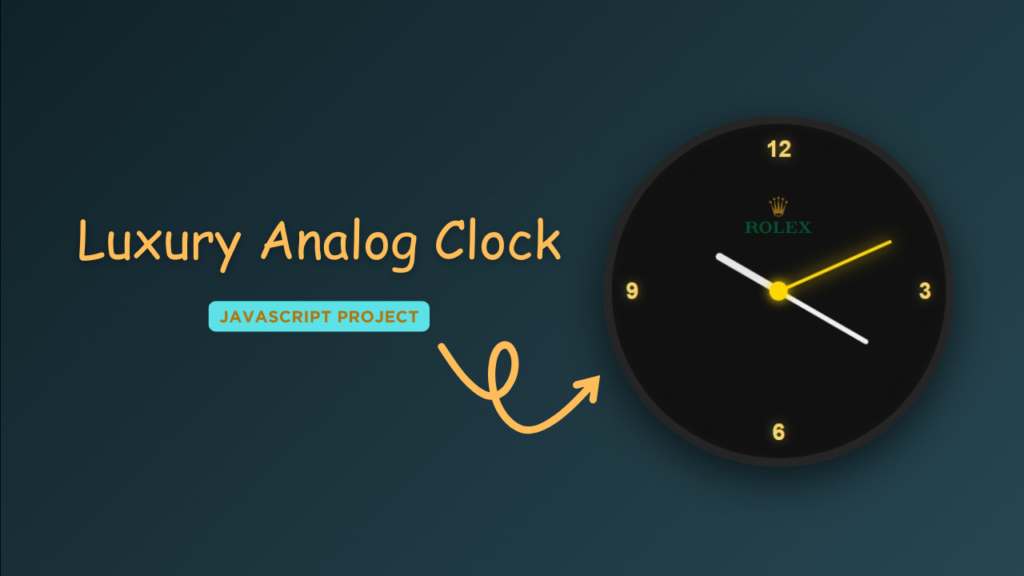
A Luxury Analog Clock is a perfect example of how simple web technologies can be used to create a premium and realistic UI component.
In this project, we build a Luxury Analog Clock using HTML, CSS, and JavaScript, focusing on smooth hand movements, elegant design, and real-time accuracy.
This project is ideal for developers who want to practice:
JavaScript date and time logic
Advanced CSS styling and animations
Real-time UI updates

Tools & Resources That Support My Web Development Work
Discover the exact hardware and services I use daily — from laptops and keyboards to hosting and domains.
1. Video Tutorial – Luxury Analog Clock Project
If you prefer learning visually, this Luxury Analog Clock project is also available as a step-by-step video tutorial.
In this video, you’ll see how the clock is built from scratch and how HTML, CSS, and JavaScript work together to create a premium analog clock.
👉 Watch the complete tutorial below to understand the design and logic clearly.
2. HTML – Clock Structure
HTML is used to create the basic structure of the analog clock.
It defines the clock container, numbers or markers, and individual elements for the hour, minute, and second hands.
A clean and semantic HTML structure makes the project:
Easy to understand
SEO-friendly
Easy to customize and extend
👉 Below is the HTML source code used for the Luxury Analog Clock.
<!DOCTYPE html>
<html lang="en">
<head>
<meta charset="UTF-8">
<meta name="viewport" content="width=device-width, initial-scale=1.0">
<title>Luxury Analog Clock | CodeByGaurav</title>
<link rel="stylesheet" href="style.css">
</head>
<body>
<div class="clock">
<div class="numbers">
<span class="twelve">12</span>
<span class="three">3</span>
<span class="six">6</span>
<span class="nine">9</span>
</div>
<div class="arrows">
<div class="hour"></div>
<div class="minute"></div>
<div class="second"></div>
</div>
<img decoding="async" src="https://upload.wikimedia.org/wikipedia/commons/thumb/f/f4/Logo_da_Rolex.png/1280px-Logo_da_Rolex.png?20210605010030" alt="1280px CodeByGaurav" title="1280px Luxury Analog Clock – Built with HTML, CSS & JavaScript">
</div>
</body>
<script src="script.js"></script>
</html>
3. CSS – Luxury Styling & Animations
CSS plays a major role in giving the clock its luxury and premium look.
With CSS, we style the clock face, apply shadows, gradients, and smooth transitions to create a realistic analog clock feel.
CSS is used for:
Clock face design and background styling
Smooth hand rotation using transforms
Shadows and highlights for a premium effect
Responsive scaling for different devices
👉 Below is the CSS source code for styling the analog clock.
					*{
    margin: 0;
    padding: 0;
    box-sizing: border-box;
    font-family: "Poppins", sans-serif;
}

body{
    height: 100vh;
    display: flex;
    justify-content: center;
    align-items: center;
    background: linear-gradient(135deg, #0f2027, #203a43, #2c5364);
}

/* Clock Body */

.clock{
    width: 340px;
    height: 340px;
    border-radius: 50%;
    background: radial-gradient(circle, #111 60%, #000);
    border: 8px solid rgba(255, 255, 255, 0.1);
    box-shadow: inset 0 0 20px rgba(255, 255, 255, 0.05), 0 15px 40px rgba(0, 0, 0, 0.6);
    position: relative;

}

/* Logo */

.clock img{
    position: absolute;
    top: 70px;
    left: 50%;
    transform: translateX(-50%);
    width: 65px;
    opacity: 0.9;
}

/* Numbers */

.numbers span{
    position: absolute;
    color: #f5d76e;
    font-size: 22px;
    font-weight: 600;
    text-shadow: 0 0 10px rgba(245, 215, 110, 0.4);
}

.twelve{
    top: 12px;
    left: 50%;
    transform: translateX(-50%);
}

.three{
    right: 14px;
    top: 50%;
    transform: translateY(-50%);
}

.six{
    bottom: 12px;
    left: 50%;
    transform: translateX(-50%);
}

.nine{
    left: 14px;
    top: 50%;
    transform: translateY(-50%);
}

/* Arrows */

.arrows{
    width: 100%;
    height: 100%;
    display: flex;
    justify-content: center;
    align-items: center;
}

.arrows::before{
    content: "";
    width: 18px;
    height: 18px;
    background: gold;
    border-radius: 50%;
    z-index: 10;
    box-shadow: 0 0 10px gold;
}

.arrows div{
    position: absolute;
    bottom: 50%;
    transform-origin: bottom;
    border-radius: 10px;
}

/* Hour */
.hour{
    height: 70px;
    width: 7px;
    background: #fff;
    opacity: 0.9;
}

/* Minute */
.minute{
    height: 100px;
    width: 5px;
    background: #f1f1f1;
}

/* Second */
.second{
    height: 120px;
    width: 3px;
    background: gold;
    box-shadow: 0 0 15px gold;
}
4. JavaScript – Real-Time Clock Logic
JavaScript handles the real-time functionality of the analog clock.
It fetches the current system time using the Date object and calculates the correct rotation angle for each clock hand.
With JavaScript:
The second hand updates every second
The minute and hour hands move smoothly
The clock stays accurate without page refresh
👉 Below is the JavaScript source code that powers the clock logic.
					const hour = document.querySelector(".hour");
const minute = document.querySelector(".minute");
const second = document.querySelector(".second");

function setData() {
    const now = new Date();

    const getSecond = now.getSeconds();
    const getMinute = now.getMinutes();
    const getHour = now.getHours();

    const secondDegree = (getSecond / 60) * 360;
    const minuteDegree = (getMinute / 60) * 360;
    const hourDegree = (getHour / 12) * 360;

    second.style.transform = `rotate(${secondDegree}deg)`;
    minute.style.transform = `rotate(${minuteDegree}deg)`;
    hour.style.transform = `rotate(${hourDegree}deg)`;
}

setInterval(setData, 1000)
Conclusion
This Luxury Analog Clock built with HTML, CSS, and JavaScript is a great project to improve frontend development skills and showcase premium UI design.
It combines real-time JavaScript logic with elegant CSS styling to create a realistic and visually appealing clock.
If you want to enhance your portfolio with a luxury UI project, this analog clock is a perfect choice.
Happy Coding 🚀
– CodeByGaurav
Tools & Resources That Support My Web Development Work
Discover the exact hardware and services I use daily — from laptops and keyboards to hosting and domains.


Pingback: Analog Clock Using JavaScript - CodeByGaurav
Pingback: Elementor #1226 - CodeByGaurav