
In today’s digital environment, security is more important than ever. Strong passwords are essential for protecting personal data, online accounts, and sensitive information. However, creating complex and secure passwords manually can be challenging.
In this tutorial, we will build a Password Generation App using HTML, CSS, and JavaScript. This web-based tool allows users to generate strong, random, and secure passwords instantly based on customizable options.
A password generator application is a practical real-world project that demonstrates how JavaScript can be used to create dynamic and useful tools. It also helps users improve their online security by generating unpredictable and complex passwords.
This project is beginner-friendly and ideal for developers who want to strengthen their JavaScript logic and frontend development skills.

Tools & Resources That Support My Web Development Work
Discover the exact hardware and services I use daily — from laptops and keyboards to hosting and domains.
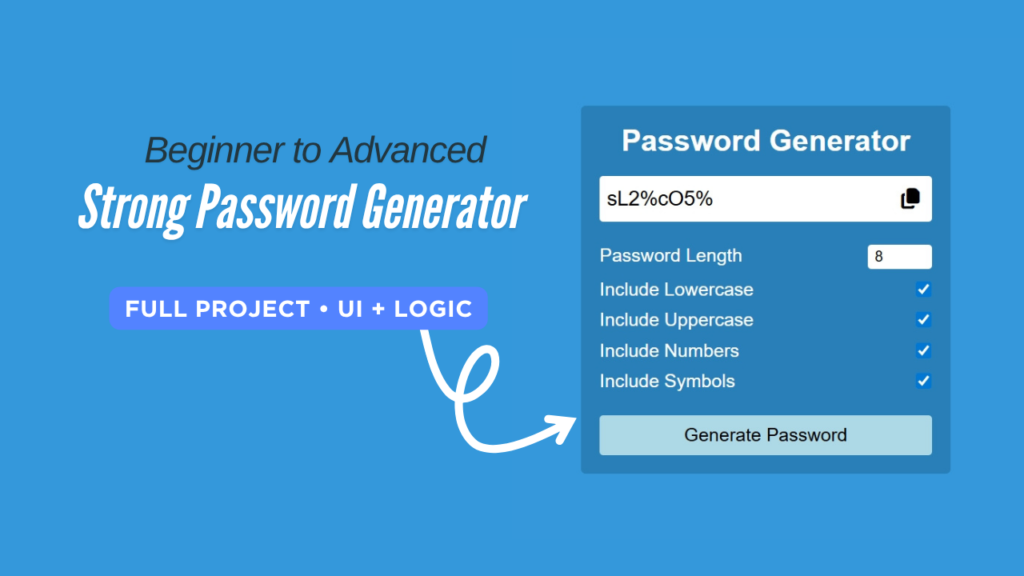
1. Video Tutorial – Password Generation App
To understand this project clearly, watch the complete video tutorial where the Password Generation App is explained step by step.
The video demonstrates:
How the app works
How passwords are generated
How the copy feature works
2. Project Overview :
The goal of this project is to create a functional password generator application with user-controlled settings.
The app allows users to:
- Select password length
- Include uppercase letters
- Include lowercase letters
- Include numbers
- Include special characters
- Generate strong random passwords
- Copy the generated password to the clipboard
When the user clicks the generate button, the application instantly creates a secure password based on the selected options.
This project reflects real-world use cases and is commonly used in authentication systems and security tools.
3. HTML Structure of the App
HTML is used to create the basic structure of the Password Generation App.
It includes elements such as:
Title of the app
Password display field
Generate and Copy buttons
Below, you can find the complete HTML code used in this project.
👉 Full HTML Code Below
					<!DOCTYPE html>
<html lang="en">
  <head>
    <meta charset="UTF-8" />
    <meta name="viewport" content="width=device-width, initial-scale=1.0" />
    <title>Password Generation App || CodeByGaurav</title>
    <link rel="stylesheet" href="style.css" />
    <link
      rel="stylesheet"
      href="https://cdnjs.cloudflare.com/ajax/libs/font-awesome/7.0.1/css/all.min.css"
    />
  </head>
  <body>
    <main>
      <h1>Password Generator</h1>
      <div class="generatePass">
        <input
          type="text"
          id="passwordGenerate"
          readonly
          placeholder=" ABc@321Abb"
        />
        <i id="copyBtn" class="fa-solid fa-copy"></i>
      </div>
      <div class="selectItems">
        <div class="select">
          <label for="length">Password Length</label>
          <input type="number" id="length" min="1" max="20" value="8" />
        </div>
        <div class="select">
          <label for="lower">Include Lowercase</label>
          <input type="checkbox" id="lower" />
        </div>
        <div class="select">
          <label for="upper">Include Uppercase</label>
          <input type="checkbox" id="upper" />
        </div>
        <div class="select">
          <label for="number">Include Numbers</label>
          <input type="checkbox" id="number" />
        </div>
        <div class="select">
          <label for="symbol">Include Symbols</label>
          <input type="checkbox" id="symbol" />
        </div>
      </div>
      <div>
        <button class="generateBtn" id="generateBtn">Generate Password</button>
      </div>
    </main>
  </body>
  <script src="script.js"></script>
</html>
4. CSS Styling for the Password Generator
CSS is used to design the visual appearance of the app.
It gives the Password Generator a modern dark theme, proper spacing, and smooth button hover effects.
With CSS, the app becomes:
Visually attractive
User-friendly
Responsive on different screen sizes
👉 Full CSS Code Below
					* {
  padding: 0;
  margin: 0;
  box-sizing: border-box;
  font-family: sans-serif;
}

body {
  background: #3498db;
  height: 100vh;
  display: flex;
  justify-content: center;
  align-items: center;
}

main {
  width: 400px;
  background: #2980b9;
  padding: 20px;
  border-radius: 5px;
  text-align: center;
  color: white;
}

h1 {
  margin-bottom: 20px;
}
.generatePass {
  position: relative;
}
.generatePass input {
  width: 100%;
  height: 50px;
  border: none;
  outline: none;
  border-radius: 4px;
  font-size: 22px;
  padding: 4px 8px;
}

.generatePass i {
  position: absolute;
  right: 10px;
  top: 50%;
  transform: translateY(-50%);
  color: black;
  font-size: 22px;
  cursor: pointer;
}

.selectItems {
  margin: 20px 0px;
}

.select {
  display: flex;
  justify-content: space-between;
  padding: 5px 0px;
}

.select label {
  font-size: 20px;
}

.select input[type="number"] {
  width: 70px;
  padding: 4px 8px;
  border: none;
  outline: none;
  border-radius: 4px;
  font-size: 16px;
}

.select input[type ="checkbox"]{
  width: 18px;
  cursor: pointer;
}

.generateBtn{
  width: 100%;
  background: lightblue;
  border: none;
  padding: 10px;
  font-size: 20px;
  border-radius: 4px;
  font-weight: 500;
  cursor: pointer;
}
5. JavaScript Logic Behind Password Generation
JavaScript is the core of this Password Generation App.
It handles:
Random password creation
Password length control
Copy-to-clipboard functionality
The logic is simple, clean, and beginner-friendly, making this project perfect for learning JavaScript fundamentals.
👉 Full JavaScript Code Below
					const upperSet = "ABCDEFGHIJKLMNOPQRSTUVWXYZ"
const lowerSet = "abcdefghijklmnopqrstuvwxyz"
const numberSet = "1234567890"
const symbolSet = "~!@#$%^&*()_+/"

const passwordGenerate = document.getElementById("passwordGenerate");
const lengthRange = document.getElementById("length");
const lower = document.getElementById("lower");
const upper = document.getElementById("upper");
const number = document.getElementById("number");
const symbol = document.getElementById("symbol");
const generateBtn = document.getElementById("generateBtn");

const generateRandom = (getData) => {
    return getData[Math.floor(Math.random() * getData.length)]
}


const generatePassword = (password = "") => {
    let selectOption = 0;

    if (lower.checked) {
        password += generateRandom(lowerSet)
        selectOption++
    }
    if (upper.checked) {
        password += generateRandom(upperSet)
        selectOption++
    }
    if (number.checked) {
        password += generateRandom(numberSet)
        selectOption++
    }
    if (symbol.checked) {
        password += generateRandom(symbolSet)
        selectOption++
    }

    if (parseInt(lengthRange.value) < selectOption) {
        lengthRange.value = selectOption
    }

    if (!password) {
        return alert("Please select al least one option to generate a Password.")
    }

    if (password.length < lengthRange.value) {
        return generatePassword(password)
    } else {
        passwordGenerate.value = password.substring(0, lengthRange.value)
    }
}

generateBtn.addEventListener("click", () => {
    generatePassword()
})

document.getElementById("copyBtn").addEventListener("click", () => {
    let inpValue = passwordGenerate.value;

    if (!inpValue) {
        alert("Nothing to Copy!")
        return
    }

    navigator.clipboard.writeText(inpValue)
        .then(() => {
            alert("Password Copied!")
        })
        .catch(() => {
            alert("Failed to copy!")
        })
})
6. Practical Use Cases :
This Password Generation App includes several powerful features:
- Strong random password generation
- Customizable password options
- Copy to clipboard feature
- Clean and modern UI
- Beginner-friendly logic
- Lightweight and fast performance
This makes it a valuable project for both learning and practical use.
7. You Might Also Like :
If you enjoyed this project, you may also like:
- Simple To-Do List using JavaScript
- Login & Signup Form with Flip Animation
- Responsive Navbar with Dropdown Menu
- Glass Login Form using HTML & CSS
These projects will help you build strong frontend development skills.
Final Conclusion
The Password Generation App is a small but powerful utility project.
It improves your understanding of JavaScript logic, DOM manipulation, and UI design while creating something practically useful.
This project is highly recommended for beginners and can be enhanced further with additional features like password strength indicators or length selectors.

I like the way you make so much beautifull layouts and now I want to say you to upload your course
Thank you so much 😊
I’m really glad you like the layouts.
A full course is not available right now, but I’m planning to share more detailed tutorials and projects very soon. Stay connected!