
Real-Time Clock with HTML, CSS & JS
An Analog Clock is a classic and visually appealing project for beginners in JavaScript. In this tutorial, you’ll learn how to build a real-time analog clock using HTML, CSS, and JavaScript, where the clock hands move smoothly based on the current system time.
This project helps you understand JavaScript date functions, CSS transforms, and DOM manipulation in a practical way.

Tools & Resources That Support My Web Development Work
Discover the exact hardware and services I use daily — from laptops and keyboards to hosting and domains.
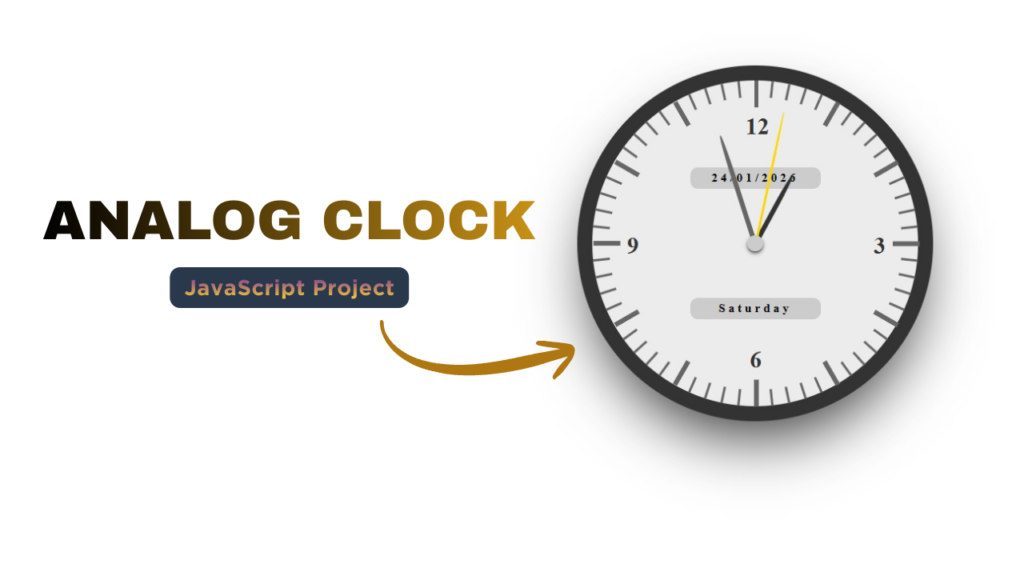
1. Video Tutorial – Analog Clock Using JavaScript
If you prefer learning visually, you can watch the complete video tutorial where the analog clock is built step by step.
In the video, you’ll learn:
Clock structure using HTML
Styling clock design with CSS
Making clock hands move using JavaScript
2. HTML Structure – Analog Clock Layout
The HTML structure defines the clock container and the clock hands (hour, minute, second).
We use simple div elements to create:
Clock dial
Hour hand
Minute hand
Second hand
👇 Below this section, you can place the complete HTML code for the analog clock.
Tip: Keep HTML clean and semantic for better readability and SEO.
					<!DOCTYPE html>
<html lang="en">
<head>
    <meta charset="UTF-8">
    <meta name="viewport" content="width=device-width, initial-scale=1.0">
    <title>Analog Clock | CodeByGaurav</title>
    <link rel="stylesheet" href="style.css">
</head>
<body>
    <div class="clock">

        <div>
            <div class="info date"></div>
            <div class="info day"></div>
        </div>
        <div class="dot"></div>

        <div>
            <div class="hour-hand"></div>
            <div class="minute-hand"></div>
            <div class="second-hand"></div>
        </div>

        <div>
            <span class="h3">3</span>
            <span class="h6">6</span>
            <span class="h9">9</span>
            <span class="h12">12</span>
        </div>

        <div class="diallines"></div>
    </div>
</body>
<script src="script.js"></script>
</html>
3. CSS Styling – Clock Design & Rotation
CSS is used to:
Design the circular clock shape
Position the clock hands at the center
Apply rotation using
transform: rotate()Add smooth transitions for better animation
Flexbox and absolute positioning help align the clock perfectly.
👇 Insert your full CSS code below this section to style the clock beautifully.
					.clock {
    background: #ececec;
    width: 300px;
    height: 300px;
    margin: 8% auto 0;
    border-radius: 50%;
    border: 14px solid #333;
    position: relative;
    box-shadow: 0 2vw 4vw -1vw rgba(0, 0, 0, 0.8);
}

.dot {
    width: 14px;
    height: 14px;
    border-radius: 50%;
    background: #ccc;
    top: 0;
    left: 0;
    right: 0;
    bottom: 0;
    margin: auto;
    position: absolute;
    z-index: 10;
    box-shadow: 0 2px 4px -1px black;
}

.hour-hand {
    position: absolute;
    z-index: 5;
    width: 4px;
    height: 65px;
    background: #333;
    top: 79px;
    transform-origin: 50% 72px;
    left: 50%;
    margin-left: -2px;
    border-top-left-radius: 50%;
    border-top-right-radius: 50%;
}

.minute-hand {
    position: absolute;
    z-index: 6;
    width: 4px;
    height: 100px;
    background: #666;
    top: 46px;
    left: 50%;
    margin-left: -2px;
    border-top-left-radius: 50%;
    border-top-right-radius: 50%;
    transform-origin: 50% 105px;
}

.second-hand {
    position: absolute;
    z-index: 7;
    width: 2px;
    height: 120px;
    background: gold;
    top: 26px;
    left: 50%;
    margin-left: -1px;
    border-top-left-radius: 50%;
    border-top-right-radius: 50%;
    transform-origin: 50% 125px;
}

span {
    display: inline-block;
    position: absolute;
    color: #333;
    font-size: 22px;
    font-family: "Poiret One";
    font-weight: 700;
    z-index: 4;
}

.h12 {
    top: 30px;
    left: 50%;
    margin-left: -9px;
}
.h3 {
    top: 140px;
    right: 30px;
}
.h6 {
    bottom: 30px;
    left: 50%;
    margin-left: -5px;
}
.h9 {
    left: 32px;
    top: 140px;
}

.diallines {
    position: absolute;
    z-index: 2;
    width: 2px;
    height: 15px;
    background: #666;
    left: 50%;
    margin-left: -1px;
    transform-origin: 50% 150px;
}
.diallines:nth-of-type(5n) {
    position: absolute;
    z-index: 2;
    width: 4px;
    height: 25px;
    background: #666;
    left: 50%;
    margin-left: -1px;
    transform-origin: 50% 150px;
}

.info {
    position: absolute;
    width: 120px;
    height: 20px;
    border-radius: 7px;
    background: #ccc;
    text-align: center;
    line-height: 20px;
    color: #000;
    font-size: 11px;
    top: 200px;
    left: 50%;
    margin-left: -60px;
    font-family: "Poiret One";
    font-weight: 700;
    z-index: 3;
    letter-spacing: 3px;
    margin-left: -60px;
    left: 50%;
}
.date {
    top: 80px;
}
.day {
    top: 200px;
}
4. JavaScript Logic – Real-Time Clock Functionality
JavaScript is the core part of this project. It:
Gets the current time using the
Date()objectCalculates degrees for hour, minute, and second hands
Updates the rotation every second
This makes the clock run in real-time, just like a real analog clock.
👇 Add your complete JavaScript code here to make the clock functional.
					let diallines = document.getElementsByClassName("diallines");
let clockE1 = document.getElementsByClassName("clock")[0];

for (var i = 1; i < 60; i++) {
    clockE1.innerHTML += "<div class='diallines'></div>";
    diallines[i].style.transform = "rotate(" + 6 * i + "deg)";
}

function clock() {
    let weekday = ["Sonday", "Monday", "Tuesday", "Wednesday", "Thursday", "Friday", "Saturday"],

        d = new Date(),
        h = d.getHours(),
        m = d.getMinutes(),
        s = d.getSeconds(),
        date = d.getDate(),
        month = d.getMonth() + 1,
        year = d.getFullYear(),

        hDeg = h * 30 + m * (360 / 720),
        mDeg = m * 6 + s * (360 / 3600),
        sDeg = s * 6,

        hE1 = document.querySelector(".hour-hand"),
        mE1 = document.querySelector(".minute-hand"),
        sE1 = document.querySelector(".second-hand"),
        dateE1 = document.querySelector(".date"),
        dayE1 = document.querySelector(".day");

        let day = weekday[d.getDay()];

        if(month < 9){
            month  = "0" + month;
        }

        hE1.style.transform = "rotate("+hDeg+"deg)";
        mE1.style.transform = "rotate("+mDeg+"deg)";
        sE1.style.transform = "rotate("+sDeg+"deg)";
        dateE1.innerHTML = date + "/" + month + "/" + year;
        dayE1.innerHTML = day;
}

setInterval(clock, 100);
5. Key Features of This Analog Clock
Real-time clock functionality
Smooth hand rotation
Built using pure HTML, CSS & JavaScript
Beginner-friendly logic
Fully customizable design
Final Conclusion
In this tutorial, you learned how to create a real-time analog clock using JavaScript with a clean and simple approach. This project is perfect for beginners who want to strengthen their JavaScript fundamentals and build interactive UI components.
You can further enhance this project by adding:
Dark & light themes
Numbers or Roman numerals
Digital time display
For more JavaScript projects and frontend tutorials, follow CodeByGaurav 🚀

Pingback: Responsive Footer Design using HTML & CSS (Beginner Friendly Tutorial) - CodeByGaurav
Pingback: Glowing Neon Button using HTML & CSS - CodeByGaurav
Pingback: Loading Animation using HTML & CSS (Modern UI Loader Design) - CodeByGaurav
Pingback: Glass Login Form using HTML & CSS (Modern Glassmorphism UI Design) - CodeByGaurav
Pingback: Login & Signup Form with Flip Animation using HTML CSS & JavaScript (Modern UI Design) - CodeByGaurav
Pingback: Animated Login Form using HTML & CSS - CodeByGaurav
Pingback: Complete Guide to Responsive Web Design using HTML & CSS (Beginner to Advanced) - CodeByGaurav