Introduction :
Creating visually appealing user interfaces is an important part of modern web development. A login form is often the first interaction users have with a website, so it should be both functional and attractive.
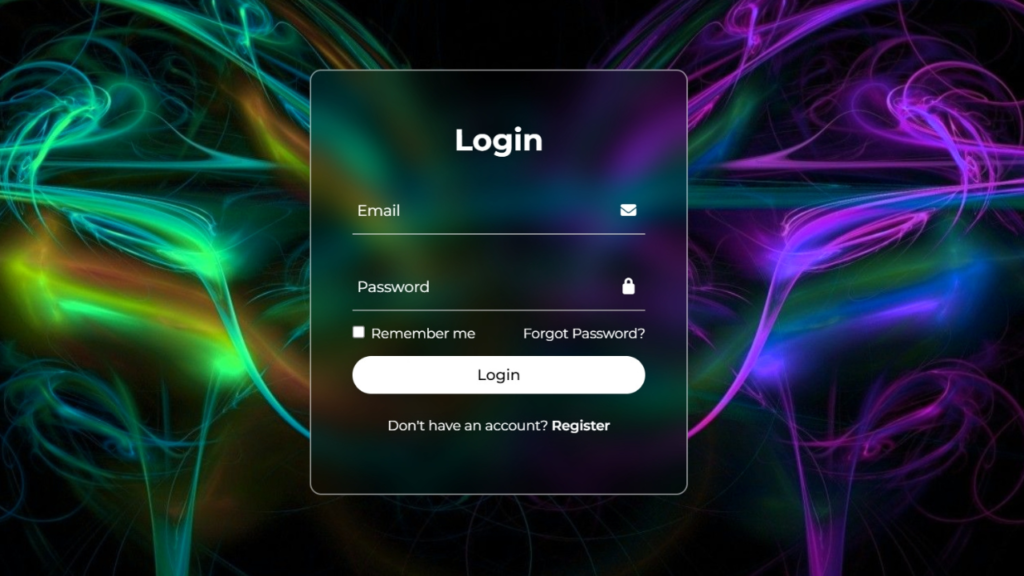
In this tutorial, we will design an Animated Login Form with Background Image using HTML and CSS. This project focuses on creating a clean login interface with a dynamic background image effect using only CSS.
Background image animations add depth and visual interest to a webpage without requiring JavaScript. By using CSS properties like transitions, overlays, and positioning, we can create a modern and engaging UI.
This project is beginner-friendly and perfect for developers who want to improve their CSS design and animation skills.

Tools & Resources That Support My Web Development Work
Discover the exact hardware and services I use daily — from laptops and keyboards to hosting and domains.
Project Overview :
The goal of this project is to create a stylish login form placed over an animated background image.
The project includes:
- Login form with username and password fields
- Background image with animation effect
- Transparent or overlay-based design
- Responsive layout
- Clean and modern UI
The background image can include subtle zoom, blur, or gradient overlay effects using CSS, making the interface more engaging without affecting performance.
Video Tutorial :
You can watch the complete step-by-step tutorial below to understand how to build this login form.
HTML Structure :
The HTML structure defines the layout of the login form and background container.
In this section, we create:
- Main container for the page
- Background image wrapper
- Login form container
- Input fields for username and password
- Login button
The structure is kept simple so that styling and animations can be applied easily using CSS.
					<!DOCTYPE html>
<html lang="en">
<head>
    <meta charset="UTF-8">
    <meta name="viewport" content="width=device-width, initial-scale=1.0">
    <title>Animated Login Form with changing Background | CodeByGaurav</title>
    <link rel="stylesheet" href="style.css">
    <link rel="stylesheet" href="https://cdnjs.cloudflare.com/ajax/libs/font-awesome/7.0.1/css/all.min.css">
</head>
<body>
    <div class="container">
        <div class="login-box">
            <form action="">
                <h2>Login</h2>

                <div class="input-box">
                    <span class="icon"><i class="fa-solid fa-envelope"></i></span>
                    <input type="email" required>
                    <label>Email</label>
                </div>

                <div class="input-box">
                    <span class="icon"><i class="fa-solid fa-lock"></i></span>
                    <input type="password" required>
                    <label>Password</label>
                </div>

                <div class="remember-forgot">
                    <label><input type="checkbox"> Remember me</label>
                    <a href="#">Forgot Password?</a>
                </div>

                <button type="submit">Login</button>

                <div class="register-link">
                    <p>Don't have an account? <a href="#">Register</a></p>
                </div>

            </form>
        </div>
    </div>
</body>
</html>
CSS Styling :
CSS is the core part of this project, as it controls both the login form design and the background animation.
We use modern CSS techniques such as:
- Background image positioning and sizing
- Overlay effects using gradients
- Flexbox for centering the form
- Border radius and shadows
- Smooth transitions
To create the animated effect, we can use:
- Background zoom (scale effect)
- Background position animation
- Overlay fade effects
These techniques create a visually dynamic background while keeping the design lightweight.
					@import url("https://fonts.googleapis.com/css2?family=Montserrat:ital,wght@0,100..900;1,100..900&display=swap");

* {
    padding: 0;
    margin: 0;
    box-sizing: border-box;
    font-family: "Montserrat", sans-serif;
}

.container{
    display: flex;
    justify-content: center;
    align-items: center;
    height: 100vh;
    width: 100%;
    background: url('./bg.jpeg');
    background-size: cover;
    background-position: center;
    animation: animateBg 5s linear infinite;
}

@keyframes animateBg {
    100%{
        filter: hue-rotate(360deg);
    }
}

.login-box{
    position: relative;
    width: 400px;
    height: 450px;
    background: transparent;
    border-radius: 12px;
    border: 2px solid rgba(255, 255, 255, 0.5);
    display: flex;
    justify-content: center;
    align-items: center;
    backdrop-filter: blur(15px);
}

h2{
    font-size: 2em;
    color: #fff;
    text-align: center;
}

.input-box{
    position: relative;
    width: 310px;
    margin: 30px 0;
    border-bottom: 1px solid white;
}

.input-box label{
    position: absolute;
    top: 50%;
    left: 5px;
    transform: translateY(-50%);
    font-size: 1em;
    color: #fff;
    pointer-events: none;
    transition: 0.5s;
}

.input-box input:focus~label,
.input-box input:valid~label{
    top: -5px;
}

.input-box input{
    width: 100%;
    height: 50px;
    background: transparent;
    border: none;
    outline: none;
    font-size: 1em;
    color: #fff;
    padding: 0 35px 0 5px;
}

.input-box .icon{
    position: absolute;
    right: 8px;
    top: 50%;
    color: #fff;
    transform: translateY(-50%);
}

.remember-forgot{
    margin: -15px 0 15px;
    font-size: 0.9em;
    color: #fff;
    display: flex;
    justify-content: space-between;
}

.remember-forgot label input{
    margin-right: 3px;
}

.remember-forgot a{
    color: #fff;
    text-decoration: none;
}

.remember-forgot a:hover{
    text-decoration: underline;
}

button{
    width: 100%;
    height: 40px;
    background: white;
    border: none;
    border-radius: 40px;
    cursor: pointer;
    font-size: 1em;
    color: #000;
    font-weight: 500;
}

.register-link{
    font-size: 0.9em;
    color: #fff;
    text-align: center;
    margin: 25px 0 10px;
}

.register-link p a{
    color: #fff;
    text-decoration: none;
    font-weight: 600;
}

.register-link p a:hover{
    text-decoration: underline;
}
Project Images – Download Resources :
To achieve the best visual result, you can use high-quality background images.
The resources may include:
- High-resolution background image
- Gradient overlay
- UI preview screenshots
👇 Download the images from here:
👉 Download Project Images (ZIP File)
👉 Get Images from GitHub Repository
Background Animation Concept :
The animation effect in this project is achieved using CSS only.
Instead of changing images dynamically, we use CSS techniques like:
background-sizeandtransformfor zoom effect@keyframesfor smooth animationbackground-positionfor movement- Overlay gradients for better readability
These effects create a smooth and continuous animation that enhances the overall UI without requiring JavaScript.
User Experience & Design Benefits :
This animated login form improves user experience by:
- Providing a visually engaging interface
- Maintaining simplicity and clarity
- Enhancing readability with overlay effects
- Offering a modern and professional look
A good UI design helps users feel comfortable and improves interaction with the website.
You Might Also Like :
If you enjoyed building this project, you may also like these tutorials:
- Login & Signup Form with Flip Animation using HTML CSS & JavaScript
- Analog Clock Using JavaScript
- Glass Login Form using HTML & CSS
These projects will help you improve your frontend development skills and build real-world UI components.
Features of This Project :
This project includes several useful features:
- Animated background using CSS only
- Modern login form design
- Clean and minimal layout
- Fully responsive design
- Lightweight and fast performance
- Beginner-friendly implementation
This makes it ideal for portfolios, landing pages, and login systems.
Conclusion :
In this tutorial, we created an Animated Login Form with Background Image using HTML and CSS. This project demonstrated how CSS can be used to create visually engaging animations without relying on JavaScript.
Using background animations enhances the look and feel of a website while maintaining performance. You can customize this project by using different images, colors, and animation styles.
Practicing such UI projects helps developers build strong design skills and create modern web interfaces.