
Introduction :
Loading animations are an essential part of modern web design. They improve user experience by providing visual feedback when a website or application is processing data or loading content.
In this tutorial, we will create a Loading Animation using HTML and CSS. This project demonstrates how simple animations can make a website feel more interactive and professional.
Loading animations are widely used in websites, mobile apps, dashboards, and web applications. They help reduce user frustration by indicating that something is happening in the background.
This beginner-friendly project will help you understand how CSS animations and keyframes work to create smooth and visually appealing effects.

Tools & Resources That Support My Web Development Work
Discover the exact hardware and services I use daily — from laptops and keyboards to hosting and domains.
Project Overview :
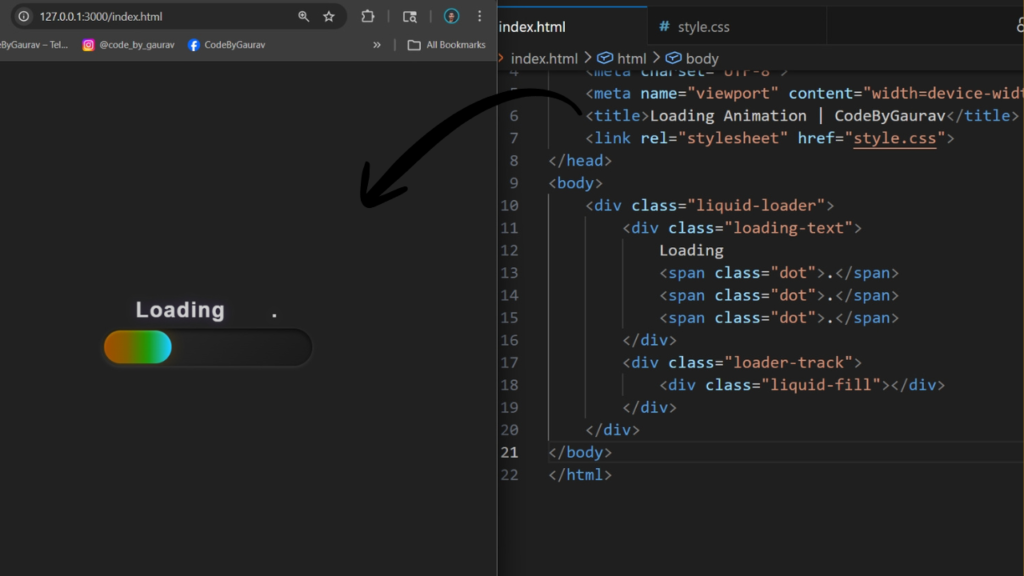
The goal of this project is to design a simple yet modern loading animation using only HTML and CSS.
The loading animation can be used in various scenarios such as:
- Page loading screens
- Data fetching indicators
- Button loading states
- App initialization screens
In this project, we will create a loader element and apply animation effects using CSS.
The animation will include:
- Repeating motion or rotation
- Smooth transitions
- Modern UI design
- Lightweight and fast performance
This project is perfect for beginners who want to learn CSS animation techniques and improve their frontend design skills.
Video Tutorial :
You can watch the complete step-by-step tutorial below to understand how the loading animation is created.
HTML Structure :
The first step is creating the structure of the loading animation using HTML.
In this section, we create a container that holds the loader element. The loader can be a simple shape such as a circle, bar, or dots.
The HTML structure is minimal because the animation effect is mainly handled using CSS.
The main elements include:
- Loader container
- Loader element
This simple structure allows us to focus on creating animation effects using CSS.
					<!DOCTYPE html>
<html lang="en">
<head>
    <meta charset="UTF-8">
    <meta name="viewport" content="width=device-width, initial-scale=1.0">
    <title>Loading Animation | CodeByGaurav</title>
    <link rel="stylesheet" href="style.css">
</head>
<body>
    <div class="liquid-loader">
        <div class="loading-text">
            Loading
            <span class="dot">.</span>
            <span class="dot">.</span>
            <span class="dot">.</span>
        </div>
        <div class="loader-track">
            <div class="liquid-fill"></div>
        </div>
    </div>
</body>
</html>
CSS Styling :
CSS is used to design and animate the loader. This is the most important part of the project.
We use CSS properties such as:
- Width and height for the loader
- Background color
- Border styling
- Border-radius for circular shapes
- Animation properties
CSS animations are created using @keyframes, which define how the loader changes over time.
We also use properties like:
- animation-duration
- animation-iteration-count
- animation-timing-function
These properties help control the speed and smoothness of the animation.
					* {
    padding: 0;
    margin: 0;
    box-sizing: border-box;
    font-family: sans-serif;
}

body {
    background: #212121;
    height: 100vh;
    display: flex;
    justify-content: center;
    align-items: center;
}

.liquid-loader {
    display: flex;
    flex-direction: column;
    align-items: center;
    gap: 5px;
    padding: 20px;
}

.loader-track {
    position: relative;
    width: 180px;
    height: 32px;
    background: linear-gradient(135deg, #2a2a2a, #1a1a1a);
    border-radius: 16px;
    overflow: hidden;
    box-shadow:
        inset 0 2px 4px rgba(0, 0, 0, 0.6),
        0 1px 3px rgba(255, 255, 255, 0.1);
}

.liquid-fill {
    position: absolute;
    top: 2px;
    left: 2px;
    height: calc(100% - 4px);
    background: linear-gradient(90deg, #4f46e5, #7c3aed, #ec4899, #f59e0b);
    border-radius: 14px;
    animation:
        fillProgress 4s ease-out infinite,
        colorShift 3s linear infinite;
    box-shadow:
        0 0 12px rgba(124, 58, 237, 0.4),
        inset 0 1px 2px rgba(255, 255, 255, 0.2);
}

.loading-text {
    color: white;
    font-size: 18px;
    font-weight: 600;
    letter-spacing: 1px;
    animation: textGlow 1s ease-in-out infinite;
}

.dot {
    margin-left: 3px;
    animation: blink 1.5s infinite;
}

.dot:nth-of-type(1) {
    animation-delay: 0s;
}
.dot:nth-of-type(2) {
    animation-delay: 0.3s;
}
.dot:nth-of-type(3) {
    animation-delay: 0.6s;
}

@keyframes fillProgress {
    0% {
        width: 4px;
    }
    25% {
        width: 25%;
    }
    50%{
        width: 50%;
    }
    75%{
        width: 75%;
    }
    100%{
        width: calc(100% - 4px);
    }
}

@keyframes colorShift{
    0%{
        filter: hue-rotate(0deg) brightness(1);
    }
    30%{
        filter: hue-rotate(120deg) brightness(1.1);
    }
    66%{
        filter: hue-rotate(240deg) brightness(0.9);
    }
    100%{
        filter: hue-rotate(360deg) brightness(1);
    }
}

@keyframes textGlow{
    0%, 100%{
        opacity: 0.7;
        text-shadow: 0 0 8px rgba(139, 92, 246, 0.3);
    }
    50%{
        opacity: 1;
        text-shadow: 0 0 16px rgba(139, 92, 246, 0.6);
    }
}

@keyframes blink{
    0%, 50%{
        opacity: 1;
    }
    51%, 100%{
        opacity: 0;
    }
}
You Might Also Like :
If you enjoyed building this project, you may also like these tutorials:
- Password Generator using JavaScript | Create Strong Random Password Generator (HTML CSS JS)
- Analog Clock Using JavaScript
These projects will help you improve your frontend development skills and build real-world UI components.
Animation Logic :
The loading animation works using CSS keyframes. Keyframes allow us to define different stages of an animation and how the element should behave at each stage.
For example:
- The loader can rotate continuously
- It can scale up and down
- It can change opacity
- It can move in a loop
These animations are repeated infinitely to create a continuous loading effect.
CSS animations are efficient and do not require JavaScript, making them lightweight and fast.
Understanding animation logic is important for creating modern UI components and improving user experience.
Features of This Project :
This Loading Animation project includes several useful features:
- Smooth CSS animations
- Lightweight and fast performance
- Modern UI design
- Beginner-friendly code
- Fully customizable animation styles
- No JavaScript required
This project is ideal for use in websites, apps, and interactive interfaces.
Conclusion :
In this tutorial, we created a Loading Animation using HTML and CSS. This project demonstrated how CSS animations can be used to create smooth and engaging visual effects.
Loading animations play an important role in improving user experience by providing feedback during waiting times. You can customize this project by creating different types of loaders such as spinners, dots, or progress bars.
Practicing animation projects like this helps you build strong CSS skills and create modern user interfaces.


Thank you for any other great article. Where else could anybody get that type of information in such a perfect
means of writing? I’ve a presentation subsequent week, and I’m on the search
for such information.
I am extremely impressed with your writing talents and also with the format to your weblog.
Is this a paid theme or did you modify it yourself?
Anyway stay up the nice quality writing, it is uncommon to look a great blog like this one today..
Here is my site; BUY VALIUM ONLINE