
Introduction :
Authentication forms such as login and signup pages are essential components of modern web applications. A well-designed authentication interface not only improves usability but also enhances the overall user experience.
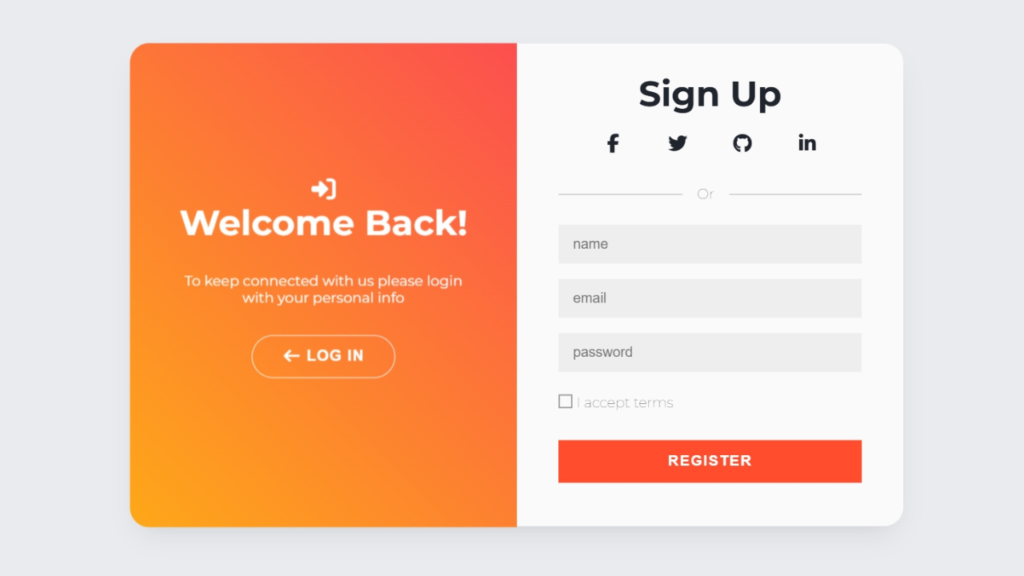
In this tutorial, we will create a Login & Signup Form with Flip Animation using HTML, CSS, and JavaScript. This project features a smooth flip animation that allows users to switch between login and signup forms in an interactive and visually appealing way.
Flip animations are widely used in modern UI design to create engaging transitions without navigating to a new page. This technique helps reduce page reloads and provides a seamless user experience.
This project is ideal for beginners and intermediate developers who want to learn how to combine layout design, animation, and interactivity into a single real-world component.

Tools & Resources That Support My Web Development Work
Discover the exact hardware and services I use daily — from laptops and keyboards to hosting and domains.
Project Overview :
The goal of this project is to build a dual authentication form that allows users to switch between login and signup views using a flip animation.
The application includes:
- Login form (email and password)
- Signup form (name, email, password)
- Flip animation between forms
- Smooth transitions
- Modern UI design
Instead of redirecting users to a different page, the interface flips like a card to reveal the other form. This creates a dynamic and interactive experience.
This project demonstrates how HTML structures the layout, CSS handles styling and animation, and JavaScript controls the interaction logic.
Video Tutorial :
You can watch the complete step-by-step tutorial below to understand how to build the flip animation login and signup form.
HTML Structure :
The HTML structure defines the layout of the login and signup forms.
In this project, we create a main container that holds two sides of a card:
- Front side for the login form
- Back side for the signup form
Each side contains input fields and buttons for user interaction.
The structure is organized in a way that supports 3D transformations and flipping effects.
Key elements include:
- Main container for the flip card
- Login form section
- Signup form section
- Buttons to switch between forms
This structured approach makes it easy to apply animations and manage the layout.
<!doctype html>
<html lang="en">
<head>
<meta charset="UTF-8" />
<meta name="viewport" content="width=device-width, initial-scale=1.0" />
<title>Login & Signup form With Flip Animation | CodeByGaurav</title>
<link rel="stylesheet" href="style.css" />
<link
rel="stylesheet"
href="https://cdnjs.cloudflare.com/ajax/libs/font-awesome/7.0.1/css/all.min.css"
/>
</head>
<body>
<div id="container">
<!-- Login -->
<div class="login">
<div class="content">
<h1>Log In</h1>
<form>
<input type="email" placeholder="email" />
<input type="password" placeholder="password" />
<span class="remember">Remember me</span>
<span class="forget">Forgot Password</span>
<span class="clearfix"></span>
<button onclick="return false;">Log In</button>
</form>
<span class="loginwith">Or Connect with</span>
<!-- Socials Icons -->
<a href="#"><i class="fa-brands fa-facebook-f"></i></a>
<a href="#"><i class="fa-brands fa-twitter"></i></a>
<a href="#"><i class="fa-brands fa-github"></i></a>
<a href="#"><i class="fa-brands fa-linkedin-in"></i></a>
<span class="copy">© 2026</span>
</div>
</div>
<!-- Front Page -->
<div class="page front">
<div class="content">
<!-- User Icon -->
<i class="fa-solid fa-user-plus userIcon"></i>
<h1>Hello, friend</h1>
<p>Enter your personal details and start journey with us</p>
<button id="register">
Register
<i class="fa-solid fa-arrow-right"></i>
</button>
</div>
</div>
<!-- Back Page -->
<div class="page back">
<div class="content">
<!-- Login Icon -->
<i class="fa-solid fa-right-to-bracket bracketIcon"></i>
<h1>Welcome Back!</h1>
<p>
To keep connected with us please login with your
personal info
</p>
<button id="login">
<i class="fa-solid fa-arrow-left"></i> Log In
</button>
</div>
</div>
<!-- Register -->
<div class="register">
<div class="content">
<h1>Sign Up</h1>
<!-- Socials icons -->
<i class="fa-brands fa-facebook-f"></i>
<i class="fa-brands fa-twitter"></i>
<i class="fa-brands fa-github"></i>
<i class="fa-brands fa-linkedin-in"></i>
<span class="loginwith">Or</span>
<form>
<input type="text" placeholder="name">
<input type="email" placeholder="email">
<input type="password" placeholder="password">
<span class="remember">I accept terms</span>
<span class="clearfix"></span>
<button onclick="return false;">Register</button>
</form>
</div>
</div>
</div>
</body>
<script src="script.js"></script>
</html>
CSS Styling :
CSS is responsible for creating the modern UI design and flip animation effect.
We use advanced CSS techniques such as:
- Flexbox for alignment
- Perspective for 3D effect
- Transform and rotate properties
- Backface visibility
- Smooth transitions
The flip animation is achieved by rotating the container along the Y-axis. When triggered, the card flips to reveal the other side.
We also style the forms with modern UI elements such as:
- Rounded input fields
- Gradient backgrounds
- Clean typography
- Button hover effects
These styles create a professional and visually appealing design.
					@import url("https://fonts.googleapis.com/css2?family=Montserrat:ital,wght@0,100..900;1,100..900&display=swap");

*, *::before, *::after{
    margin: 0;
    padding: 0;
    box-sizing: inherit;
}
html {
    font-family: "Montserrat", sans-serif;
    height: 100%;
    font-size: 65.2%;
    box-sizing: border-box;
    -webkit-font-smoothing:antialiased;
    font-weight: 400;
}
body{
    height: 100%;
    background: #e9ebee;
    color: #1d2129;
    display: flex;
    align-items: center;
    flex-direction: column;
    justify-content: center;
    perspective: 1500px;
}

h1{
    font-weight: 700;
    font-size: 3.5em;
    text-align: center;
}

form input{
    background: #eee;
    border: none;
    padding: 12px 15px;
    margin: 8px 0;
    width: 100%;
    font-size: 1.4em;
}

span{
    color: #333;
    font-size: 1.4em;
    display: inline-block;
    margin: 15px auto;
    font-weight: 100;
}

span.remember{
    float: left;
}

span.remember::before{
    content: "";
    display: inline-block;
    width: 1em;
    height: 1em;
    border: 2px solid #999;
    vertical-align: top;
    margin-right: 4px;
}

span.forget{
    float: right;
}

span.clearfix{
    clear: both;
    display: table;
}

span.loginwith{
    display: block;
    width: 100%;
    margin-top: 1em;
    white-space: nowrap;
    overflow: hidden;
    display: flex;
    justify-content: center;
    align-items: center;
}

span.loginwith::before{
    content: "";
    display: inline-block;
    width: 42%;
    height: 1px;
    background: #aaa;
    vertical-align: middle;
    margin-right: 5%;
}

span.loginwith::after{
    content: "";
    display: inline-block;
    width: 45%;
    height: 1px;
    background: #aaa;
    vertical-align: middle;
    margin-left: 5%;
}

span.copy{
    display: block;
    position: absolute;
    bottom: 0;
    font-size: 1em;
}

button{
    display: block;
    margin: 1em auto;
    border-radius: 40px;
    border: 1px solid #ff4b2b;
    background: #ff4b2b;
    color: #fff;
    font-size: 1.5em;
    font-weight: bold;
    padding: 0.8em 2em;
    letter-spacing: 1px;
    text-transform: uppercase;
    transition: transform 80ms ease-in;
}

button i{
    vertical-align: middle;
}

button:hover{
    cursor: pointer;
}

button:active{
    transform: scale(0.95);
}

button:focus{
    outline: none;
}

#container{
    width: 95%;
    max-width: 800px;
    height: 500px;
    position: relative;
    border-radius: 20px;
    box-shadow: 0 14px 28px -10px rgba(0, 0, 0, 0.1), 0 10px 10px -10px rgba(0, 0, 0, 0.02);
    transform-style: preserve-3d;
}

#container > div{
    position: absolute;
    width: 50%;
    min-width: 350px;
    height: 100%;
    top: 0;
    display: flex;
    flex-direction: column;
    align-items: center;
    justify-content: center;
}

.content{
    width: 100%;
    padding: 2em 4em;
    text-align: center;
}

.content p{
    font-size: 1.4em;
}

.login{
    left: 0;
    background: #fafafa;
    border-radius: 20px 0 0 20px;
}

.login button{
    border-radius: 0px;
    width: 100%;
}

.login i{
    margin: 1em;
    stroke: #999;
    font-size: 20px;
}

.register{
    right: 0;
    z-index: 1;
    border-radius: 0 20px 20px 0;
    background: #fafafa;
}

.register button{
    border-radius: 0px;
    width: 100%;
}

.register i{
    margin: 1em;
    stroke: #999;
    font-size: 20px;
}

.page{
    right: 0;
    color: white;
    border-radius: 0 20px 20px 0;
    transform-origin: left center;
    transition: --webkit-animation 1s linear;
    transition: animation 1s linear;
    transition: animation 1s linear, -webkit-animation 1s linear;
}

.page button{
    border-color: #fff;
    background: transparent;
}

.page p{
    margin: 2em auto;

}

.front{
    background: linear-gradient(-25deg, #ffcf00 0%, #fc4f4f 100%) no-repeat 0 0/200%;
    z-index: 3;
}

.back{
    background: linear-gradient(135deg, #fc4f4f 0%, #ffcf00 100%) no-repeat 0 0/200%;
    z-index: 2;
}

.back .content{
    transform: rotateY(180deg);
}

.active .front{
    -webkit-animation: rot-front 0.6s ease-in-out normal forwards;
    animation: rot-front 0.6s ease-in-out normal forwards;
}

.active .back{
    -webkit-animation: rot-back 0.6s ease-in-out normal forwards;
    animation: rot-back 0.6s ease-in-out normal forwards;
}

.close .front{
    -webkit-animation: close-rot-front 0.6s ease-in-out normal forwards;
    animation: close-rot-front 0.6s ease-in-out normal forwards;
}

.close .back{
    -webkit-animation: close-rot-back 0.6s ease-in-out normal forwards;
    animation: close-rot-back 0.6s ease-in-out normal forwards;
}

@-webkit-keyframes rot-front{
    from{
        transform: translateZ(2px) rotateY(0deg);
    }
    to{
        transform: translateZ(1px) rotateY(-180deg);
    }
}

@keyframes rot-front{
    from{
        transform: translateZ(2px) rotateY(0deg);
    }
    to{
        transform: translateZ(1px) rotateY(-180deg);
    }
}

@-webkit-keyframes close-rot-front{
    from{
        transform: translateZ(1px) rotateY(-180deg);
    }
    to{
        transform: translateZ(2px) rotateY(0deg);
    }
}
@keyframes close-rot-front{
    from{
        transform: translateZ(1px) rotateY(-180deg);
    }
    to{
        transform: translateZ(2px) rotateY(0deg);
    }
}

@-webkit-keyframes rot-back{
    from{
        transform: translateZ(1px) rotateY(0deg);
    }
    to{
        transform: translateZ(2px) rotateY(-180deg);
    }
}
@keyframes rot-back{
    from{
        transform: translateZ(1px) rotateY(0deg);
    }
    to{
        transform: translateZ(2px) rotateY(-180deg);
    }
}

@-webkit-keyframes close-rot-back{
    from{
        transform: translateZ(2px) rotateY(-180deg);
    }
    to{
        transform: translateZ(1px) rotateY(0deg);
    }
}
@keyframes close-rot-back{
    from{
        transform: translateZ(2px) rotateY(-180deg);
    }
    to{
        transform: translateZ(1px) rotateY(0deg);
    }
}

.active .register .content{
    -webkit-animation: show 0.7s ease-in-out normal forwards;
    animation: show 0.7s ease-in-out normal forwards;
}

.close .register .content{
    -webkit-animation: hide 0.7s ease-in-out normal forwards;
    animation: hide 0.7s ease-in-out normal forwards;
}

.active .login .content{
    -webkit-animation: hide 0.7s ease-in-out normal forwards;
    animation: hide 0.7s ease-in-out normal forwards;
}

.close .login .content{
    -webkit-animation: show 0.7s ease-in-out normal forwards;
    animation: show 0.7s ease-in-out normal forwards;
}

@-webkit-keyframes show{
    from{
        opacity: 0;
        transform: scale(0.8);
    }
    to{
        opacity: 0.99;
        transform: scale(0.99);
    }
}
@keyframes show{
    from{
        opacity: 0;
        transform: scale(0.8);
    }
    to{
        opacity: 0.99;
        transform: scale(0.99);
    }
}

@-webkit-keyframes hide{
    from{
        opacity: 0.99;
        transform: scale(0.99);
    }
    to{
        opacity: 0;
        transform: scale(0.8);
    }
}
@keyframes hide{
    from{
        opacity: 0.99;
        transform: scale(0.99);
    }
    to{
        opacity: 0;
        transform: scale(0.8);
    }
}

.userIcon{
    font-size: 25px;
}

.bracketIcon{
    font-size: 25px;
}
JavaScript Logic :
JavaScript is used to control the flipping behavior between the login and signup forms.
The logic works as follows:
- Detect when the user clicks on the “Sign Up” or “Login” button.
- Add or remove a class to the main container.
- This class triggers the CSS flip animation.
- The form flips smoothly to display the selected section.
JavaScript ensures that the interaction is smooth and responsive.
Additional enhancements may include:
- Form validation
- Input error handling
- Toggle password visibility
This combination of JavaScript and CSS creates a fully interactive authentication UI.
					const registerButton = document.getElementById("register");
const loginButton = document.getElementById("login");
const container = document.getElementById("container");

registerButton.onclick = function (){
    container.className = 'active'
}

loginButton.onclick = function (){
    container.className = 'close'
}
Animation Concept :
The flip animation is based on CSS 3D transformations.
Key concepts include:
- Perspective to create depth
- Rotation along the Y-axis
- Backface visibility to hide the reverse side
- Smooth transitions for fluid motion
This animation technique is widely used in cards, sliders, and UI components to create modern interactive designs.
User Experience & Practical Use :
This login and signup form improves user experience by:
- Reducing page navigation
- Providing smooth transitions
- Keeping users engaged
- Offering a clean and modern interface
This type of UI is commonly used in:
- Web applications
- SaaS platforms
- Portfolio websites
- Authentication systems
It enhances both functionality and design.
You Might Also Like :
If you enjoyed building this project, you may also like these tutorials:
- Password Generator using JavaScript | Create Strong Random Password Generator (HTML CSS JS)
- Analog Clock Using JavaScript
These projects will help you improve your frontend development skills and build real-world UI components.
Features of This Project :
This project includes several powerful features:
- Flip animation between login and signup forms
- Modern UI design
- Smooth transitions
- Beginner-friendly structure
- Interactive user experience
- Fully customizable layout
This makes it a valuable addition to any frontend portfolio.
Conclusion :
In this tutorial, we built a Login & Signup Form with Flip Animation using HTML, CSS, and JavaScript. This project demonstrated how to create interactive UI components using modern frontend techniques.
Flip animations provide a smooth and engaging way to switch between different sections without reloading the page. You can enhance this project further by adding backend integration, authentication logic, or additional animations.
Building projects like this helps developers improve both their technical and design skills.



Pingback: Password Generation App Using JavaScript - CodeByGaurav
Pingback: Animated Login Form using HTML & CSS - CodeByGaurav