
Introduction :
A footer is an essential part of every website. It appears at the bottom of a webpage and usually contains important information such as navigation links, contact details, social media icons, and copyright text.
In this tutorial, we will learn how to build a responsive footer design using HTML and CSS. A responsive footer automatically adjusts its layout for different screen sizes, including desktops, tablets, and mobile devices.
Creating a responsive footer is an excellent beginner project because it helps you understand layout structure, responsive design techniques, and modern UI styling. By the end of this tutorial, you will have a clean and professional footer that you can use in your own web development projects.

Tools & Resources That Support My Web Development Work
Discover the exact hardware and services I use daily — from laptops and keyboards to hosting and domains.
Project Overview :
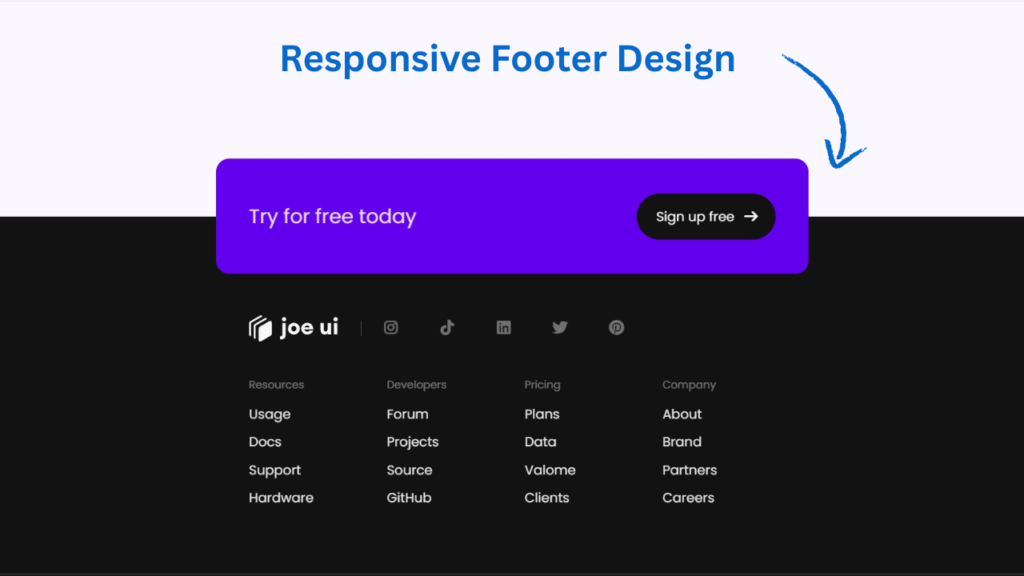
The goal of this project is to design a modern and responsive footer section that looks good on all devices. We will create multiple sections inside the footer to organize different types of content.
The footer layout will include:
Website logo or title
Quick navigation links
Contact information
Social media icons
Copyright text
Using CSS, we will arrange these sections in a flexible layout that adapts to different screen sizes. On larger screens, the footer will display multiple columns, while on smaller screens it will stack vertically for better readability.
This project will help you learn how to structure and style real-world UI components used in almost every website.
Video Tutorial :
You can watch the complete step-by-step video tutorial below to understand how this responsive footer is built from scratch.
HTML Structure :
The first step is creating the footer layout using HTML. HTML provides the structure for the footer elements such as sections, headings, and links.
In this project, we create a main footer container that holds multiple columns. Each column represents a different category such as navigation links, resources, or contact information.
This structured layout helps keep the footer organized and easy to navigate for users.
Key elements included in the HTML structure:
Footer container
Section headings
Navigation links
Social media links
Copyright area
<!DOCTYPE html>
<html lang="en">
<head>
<meta charset="UTF-8">
<meta name="viewport" content="width=device-width, initial-scale=1.0">
<title>Responsive Footer Using Html And Css | CodeByGaurav</title>
<link rel="stylesheet" href="style.css">
<link rel="stylesheet" href="https://cdnjs.cloudflare.com/ajax/libs/font-awesome/7.0.1/css/all.min.css">
</head>
<body>
<footer>
<div class="container">
<article>
<h2>Try for free today</h2>
<button>
<p>Sign up free</p>
<i class="fa-solid fa-arrow-right"></i>
</button>
</article>
<section>
<img decoding="async" src="logo.svg" alt="logo" title="logo Responsive Footer Design using HTML & CSS (Beginner Friendly Tutorial)">
<div class="socials">
<i class="fa-brands fa-instagram"></i>
<i class="fa-brands fa-tiktok"></i>
<i class="fa-brands fa-linkedin"></i>
<i class="fa-brands fa-twitter"></i>
<i class="fa-brands fa-pinterest"></i>
</div>
<ul>
<li>
<h3>Resources</h3>
<a>Usage</a>
<a>Docs</a>
<a>Support</a>
<a>Hardware</a>
</li>
<li>
<h3>Developers</h3>
<a>Forum</a>
<a>Projects</a>
<a>Source</a>
<a>GitHub</a>
</li>
<li>
<h3>Pricing</h3>
<a>Plans</a>
<a>Data</a>
<a>Valome</a>
<a>Clients</a>
</li>
<li>
<h3>Company</h3>
<a>About</a>
<a>Brand</a>
<a>Partners</a>
<a>Careers</a>
</li>
</ul>
</section>
</div>
</footer>
</body>
</html>
CSS Styling :
After creating the structure with HTML, we style the footer using CSS to make it visually appealing and responsive.
CSS is used to control layout, colors, spacing, typography, and alignment. We will also use responsive design techniques so that the footer adjusts properly on smaller screens.
Some important CSS concepts used in this project include:
Flexbox or Grid layout
Padding and spacing
Background colors
Hover effects for links
Responsive media queries
These styles help create a clean and professional footer design that enhances the overall look of the website.
					@import url("https://fonts.googleapis.com/css2?family=Poppins:ital,wght@0,100;0,200;0,300;0,400;0,500;0,600;0,700;0,800;0,900;1,100;1,200;1,300;1,400;1,500;1,600;1,700;1,800;1,900&display=swap");

* {
    box-sizing: border-box;
    font-family: "Poppins", sans-serif;
}

body{
    background: #faf7ff;
}

.container{
    max-width: 800px;
    margin: 0 auto;
}

footer{
    position: fixed;
    left: 0;
    bottom: 0;
    right: 0;
    padding-bottom: 20px;
    background: #121212;
    color: #f9f9f9;
}

footer article{
    display: flex;
    flex-direction: column;
    align-items: center;
    justify-content: space-between;
    margin: -90px auto 10px;
    min-height: 180px;
    width: 70vw;
    padding: 20px 30px 40px;
    border-radius: 16px;
    background: #6200ee;
}

footer article h2{
    font-size: 22px;
    font-weight: 400;
    text-align: center;
    color: rgb(255 255 255 / 86%);
}

footer article button{
    display: flex;
    align-items: center;
    justify-content: space-between;
    gap: 10px;
    padding: 0 20px 0 24px;
    background: #121212;
    border: 0;
    border-radius: 30px;
    white-space: nowrap;
    color: #f9f9f9;
    font-size: 16px;
}

footer section{
    padding: 0 80px;
}

footer section{
    position: relative;
    padding-top: 30px;
    margin-bottom: 100px;
}

footer section img{
    display: block;
    height: 32px;
    margin: 0 auto 30px;
}

footer section h3{
    color: rgb(255 255 255 / 40%);
    font-weight: 400;
    font-size: 13px;
}

footer section ul{
    list-style: none;
    padding: 0;
    margin: 0;
    display: grid;
    gap: 30px;
    grid-template-columns: repeat(2, 1fr);
    place-items: center;
    text-align: center;
}

footer section ul li a{
    display: block;
    margin-bottom: 10px;
    color: rgb(255 255 255 / 90%);
}

.socials{
    position: absolute;
    left: 50%;
    bottom: -60px;
    translate: -50% 0;
    display: flex;
    gap: 24px;
    font-size: 20px;
    color: rgb(255 255 255 / 40%);
}

@media(width > 530px){
    footer article{
        flex-direction: row;
        align-items: center;
        justify-content: space-between;
        padding: 30px 40px 30px;
        margin: -70px 40px 20px;
        min-height: 140px;
        width: auto;
    }

    footer article h2{
        font-size: 24px;
    }

    footer section{
        margin-bottom: 50px;
    }

    footer section img{
        margin: 0 0 30px;
    }

    footer section ul{
        grid-template-columns: repeat(4, 1fr);
        padding-right: 0;
        place-items: start;
        text-align: left;
    }

    .socials{
        top: 37px;
        left: 216px;
        bottom: auto;
        font-size: 18px;
        gap: 3vw;
        translate: 0;
        padding-left: 24px;
        border-left: 1px solid rgb(255 255 255 / 20%);
    }
}
Responsive Design Logic :
To make the footer responsive, we use CSS media queries. Media queries allow the layout to adapt depending on the screen width.
For example:
On large screens, the footer displays multiple columns in a row.
On tablets, the layout adjusts to fewer columns.
On mobile devices, the footer sections stack vertically.
This ensures that the footer remains easy to read and navigate regardless of the device being used.
Responsive design is an essential skill for modern web developers because users access websites from a wide range of devices.
You Might Also Like :
If you enjoyed building this project, you may also like these frontend development tutorials:
These projects will help you practice real-world UI components using HTML, CSS, and JavaScript.
Features of This Project :
This responsive footer design includes several useful features:
Clean and modern layout
Fully responsive design
Organized footer sections
Smooth hover effects on links
Beginner-friendly HTML and CSS code
Mobile-friendly layout
These features make the footer suitable for portfolios, blogs, landing pages, and business websites.
Conclusion :
In this tutorial, we built a responsive footer design using HTML and CSS. This project demonstrated how to structure footer sections, style them using modern CSS techniques, and ensure that the layout adapts smoothly across different devices.
A well-designed footer improves both user experience and website navigation. You can customize this footer further by adding more sections, integrating social media icons, or including newsletter subscription forms.
Practicing small projects like this is one of the best ways to improve your frontend development skills and build a strong portfolio.



Thank you sir for your support
thanks my dear brother
Frisse adult websites bieden geavanceerde inhoud voor
volwassenen. Kies voor veilige nieuwe hubs voor veilig kijken.
My blog; buy cannabis online
ok brother
Pingback: Social Icons with Hover Effects Using HTML & CSS - CodeByGaurav
Good
Thank u so much