
A navigation bar (navbar) is one of the most important UI components of any website.
In this tutorial, we will build a responsive Navbar with Hover Effects using HTML and CSS, focusing on clean design and smooth user interaction.
Hover effects improve user experience by providing visual feedback and making navigation more engaging.
This project is perfect for beginners who want to practice UI design, CSS transitions, and layout techniques.
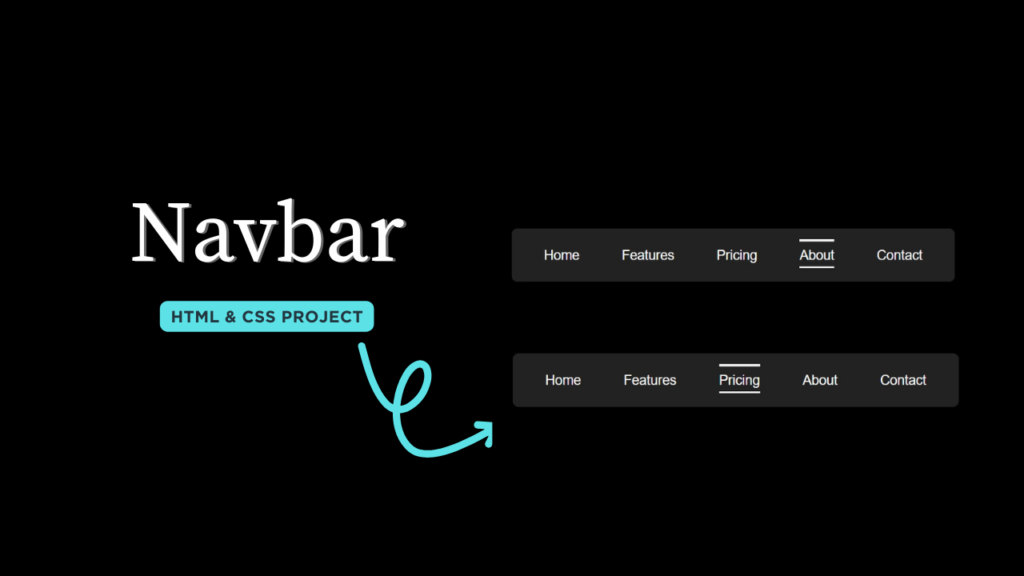
1. Video Tutorial – Navbar with Hover Effects (HTML & CSS)
If you prefer learning visually, this Navbar with Hover Effects project is also explained in a step-by-step video tutorial.
In the video, you will see how the navbar is built from scratch and how hover effects are applied using pure CSS.
👉 Watch the complete tutorial below to understand the structure and styling clearly.
2. HTML Structure – Navbar Layout
The HTML part defines the basic structure of the navigation bar.
It includes a logo section and a list of navigation links wrapped inside semantic elements.
Using clean and semantic HTML ensures:
Better accessibility
Easy customization
SEO-friendly markup
The hover effects and animations are handled entirely using CSS, keeping the HTML simple and readable.
👉 Below is the HTML source code used to create the navbar layout.
					<!DOCTYPE html>
<html lang="en">
    <head>
        <meta charset="UTF-8" />
        <meta name="viewport" content="width=device-width, initial-scale=1.0" />
        <title>CodeByGaurav || Navbar With Hover Effects</title>
        <link rel="stylesheet" href="style.css" />
    </head>
    <body>
        <nav>
            <ul>
                <li class="link"><a href="#">Home</a></li>
                <li class="link"><a href="#">Features</a></li>
                <li class="link"><a href="#">Pricing</a></li>
                <li class="link"><a href="#">About</a></li>
                <li class="link"><a href="#">Contact</a></li>
            </ul>
        </nav>
    </body>
</html>
3. CSS Styling – Hover Effects & Animations
CSS is used to design the navbar and create smooth hover effects on navigation links.
With the help of CSS transitions and pseudo-elements, we add interactive effects that enhance the overall UI.
In this project, CSS is used for:
Horizontal menu alignment
Hover underline / background animation
Smooth transitions
Responsive spacing
These hover effects make the navbar feel modern and improve usability without using JavaScript.
👉 Below is the CSS source code for the navbar hover effects.
					*{
    padding: 0;
    margin: 0;
    box-sizing: border-box;
    font-family: sans-serif;
}

body{
    display: flex;
    align-items: center;
    justify-content: center;
    height: 100vh;
    background-color: #000;
}

nav{
    height: 3rem;
    background: #222;
    width: 25rem;
    border-radius: 5px;
}

ul{
    display: flex;
    align-items: center;
    justify-content: space-around;
    padding: 10px;
}

a{
    font-size: 12px;
    text-decoration: none;
    color: #fff;
}

.link{
    position: relative;
    list-style: none;
    padding: 4px 0;
}

.link::after,
.link::before{
    content: "";
    position: absolute;
    width: 0;
    height: 2px;
    background: #fff;
    transition: all 0.6s ease-in-out;
}

.link::after{
    top: 0;
    right: 0;
    transform-origin: right;
}

.link::before{
    left: 0;
    bottom: 0;
    transform-origin: left;
}

.link:hover::after,
.link:hover::before{
    width: 100%;
}
✅ Conclusion
This Navbar with Hover Effects using HTML and CSS is a simple yet powerful frontend project.
It helps you understand how hover interactions, transitions, and layout techniques work in real-world websites.
You can enhance this navbar further by adding:
Dropdown menus
Mobile toggle menu
Active link indicator
Try experimenting with different hover styles and make your own unique design 🚀

Tools & Resources That Support My Web Development Work
Discover the exact hardware and services I use daily — from laptops and keyboards to hosting and domains.


Hi Gaurav! Thanks for the lovely design. Keep up the Good work!
Thank you! 😊 Really glad you liked the design. Your support keeps me motivated!