
A Password Generator is a useful web tool that helps users create strong and secure passwords instantly.
In this project, we build a modern Password Generator using HTML, CSS, and JavaScript, where users can generate random passwords and copy them with a single click.
This project is ideal for beginners who want to learn:
JavaScript logic building
DOM manipulation
UI design using CSS
1.Video Tutorial – Password Generator Project
If you prefer learning visually, this Password Generator project is also explained in a step-by-step video tutorial.
In the video, you’ll see how the password is generated dynamically and how the UI behaves in real time.
👉 Watch the complete tutorial below to understand the logic and design clearly.
2. HTML Structure – Password Generator Layout
The HTML code defines the basic structure of the Password Generator interface.
It includes a title, an input field to display the generated password, and action buttons like Generate and Copy.
Using clean and semantic HTML keeps the layout:
Easy to understand
Accessible
SEO-friendly
All styling and functionality are added separately using CSS and JavaScript.
👉 Below is the complete HTML source code for the Password Generator.
					<!DOCTYPE html>
<html lang="en">
<head>
    <meta charset="UTF-8">
    <meta name="viewport" content="width=device-width, initial-scale=1.0">
    <title>CodeByGaurav || Password Generator</title>
    <link rel="stylesheet" href="style.css">
</head>
<body>
    <div class="container">
        <h1>Password Generator</h1>
        <input type="text" id="password" placeholder="Password" readonly>
        <div class="btnContainer">
            <div class="btn" onclick="genPassword()">generate</div>
            <a href="" class="btn" onclick="copyPassword()">copy</a>
        </div>
    </div>
</body>
<script src="script.js"></script>
</html>
3. CSS Styling – Modern UI Design
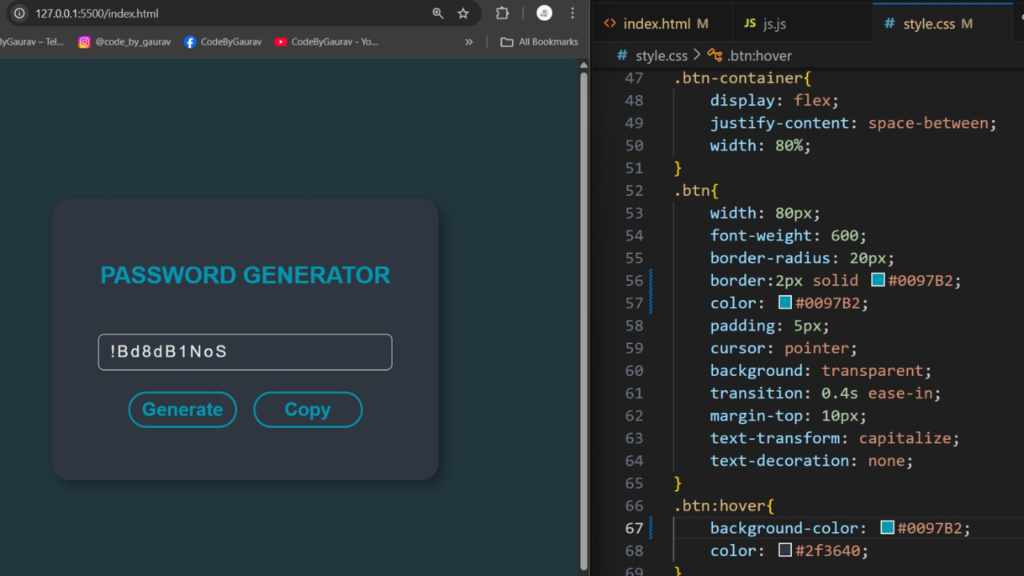
CSS is used to design a clean, modern, and attractive user interface, as shown in the thumbnail.
It helps create a card-based layout, rounded buttons, hover effects, and smooth transitions.
This project uses CSS for:
Centered card layout
Button hover effects
Color contrast for better readability
Responsive design
The UI looks professional on both desktop and mobile screens.
👉 Below is the CSS source code used to style the Password Generator.
					body{
    display: flex;
    justify-content: center;
    align-items: center;
    background: #22363f;
    height: 100vh;
}

.container{
    height: 220px;
    width: 250px;
    display: flex;
    flex-direction: column;
    color: #0097b2;
    justify-content: center;
    align-items: center;
    padding: 10px 40px;
    border-radius: 15px;
    background: #2f3640;
    font-family: Arial, Helvetica, sans-serif;
    box-shadow: 5px 5px 10px rgba(0, 0, 0, 0.3);

}

.container h1{
    text-align: center;
    font-size: 20px;
    margin-top: 10px;
    color: #0097b2;
    text-transform: uppercase;
    font-family: sans-serif;
    margin-bottom: 30px;
}

input{
    width: 230px;
    height: 30px;
    margin: 8px 3px;
    outline: none;
    border: 1px solid #ecf0f1;
    border-radius: 5px;
    color: #ecf0f1;
    background: transparent;
    padding: 0 10px;
    letter-spacing: 2px;
    font-size: 14px;
}

input::placeholder{
    font-size: 20px;
}

.btnContainer{
    display: flex;
    justify-content: space-between;
    width: 80%;
}

.btn{
    width: 80px;
    font-weight: 600;
    border-radius: 20px;
    border: 2px solid #0097b2;
    color: #0097b2;
    padding: 5px;
    cursor: pointer;
    background: transparent;
    transition: 0.4s ease-in;
    margin-top: 10px;
    text-transform: capitalize;
    text-decoration: none;
    text-align: center;
}

.btn:hover{
    background: #0097b2;
    color: #2f3640;
}
4. JavaScript Logic – Password Generation & Copy Feature
JavaScript is the core of this Password Generator project.
It generates random passwords using a combination of uppercase letters, lowercase letters, numbers, and special characters.
With simple JavaScript logic:
A strong password is generated instantly
The password is displayed in the input field
Users can copy the password with one click
This makes the project practical and useful in real-world applications.
👉 Below is the JavaScript source code for password generation and copy functionality.
					const password = document.getElementById("password");

function genPassword(){
    var chars = "0123456789abcdefghijklmnopqrstuv!@#$%^&*()ABCDEFGHIJKLMNOPQRSTUVWXYZ";

    var passLength = 10;
    var password = "";

    for(var i = 0; i < passLength; i++){
        var randomNumber = Math.floor(Math.random()* chars.length);
        password += chars.substring(randomNumber, randomNumber + 1)
    }

    document.getElementById("password").value = password;
}

function copyPassword(){
    var copyText = document.getElementById("password");
    copyText.select();
    document.execCommand("copy");
}
✅ Conclusion
This Password Generator using HTML, CSS, and JavaScript is a practical and beginner-friendly project.
It helps you understand JavaScript logic, DOM manipulation, and UI design in a real-world use case.
You can enhance this project further by adding:
Password length selector
Strength indicator
Checkbox options for characters
Try customizing the design and improving the features to make it even more powerful 🚀


Sir your videos always surprise me! Really Good!
Thank you so much! 😊 I’m really glad my videos keep surprising you. More quality content coming soon!
Pingback: Password Generation App Using JavaScript - CodeByGaurav