
Card designs are one of the most popular UI components used in modern web development. They are widely used to display content in a clean and organized way, such as blog posts, product listings, user profiles, and portfolio items.
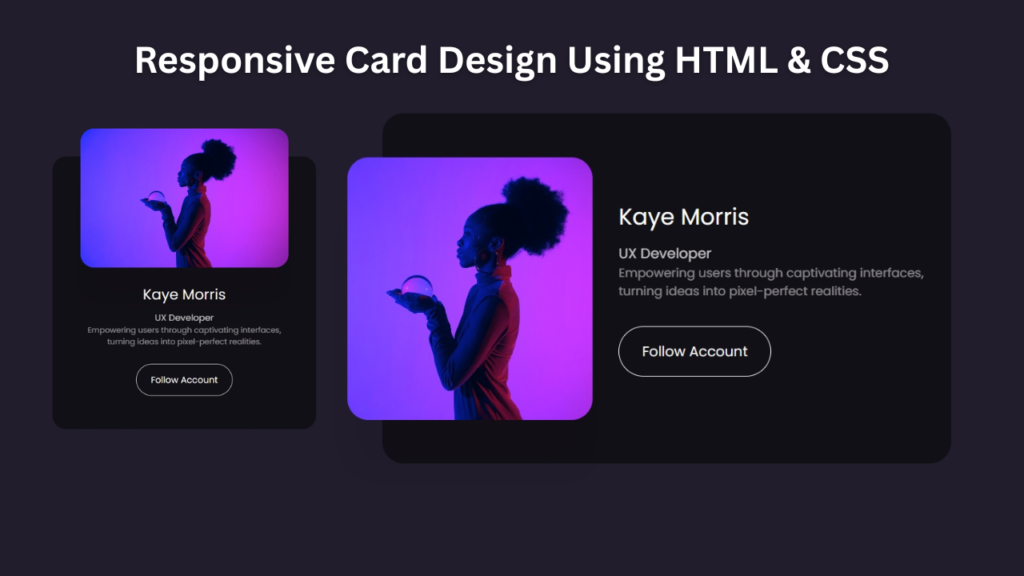
In this tutorial, we will create a Responsive Card Design using HTML and CSS. This project demonstrates how to build modern card layouts that automatically adjust to different screen sizes.
Responsive cards improve user experience by ensuring that content looks visually appealing on desktops, tablets, and mobile devices. This makes them an essential component in modern website design.
This project is beginner-friendly and helps you understand layout structuring, responsiveness, and UI design techniques.

Tools & Resources That Support My Web Development Work
Discover the exact hardware and services I use daily — from laptops and keyboards to hosting and domains.
1. Project Overview :
The goal of this project is to design a flexible and responsive card layout.
Each card typically contains:
- An image or thumbnail
- Title or heading
- Description text
- Call-to-action button
The cards will be arranged in a grid layout on larger screens and will adjust to fewer columns on smaller devices.
This project demonstrates how to use CSS layout techniques such as flexbox or grid to create responsive UI components.
2. Video Tutorial – Responsive Card Design
If you prefer visual learning, you can follow the step-by-step video tutorial where the responsive card is built from scratch using HTML and CSS.
In the tutorial, you will learn:
Creating card structure with HTML
Styling the card using CSS
Adding hover effects and transitions
Making the card layout responsive
3. HTML Structure – Card Layout
The HTML structure of a responsive card usually includes:
A main card container
An image section
A title and description
A call-to-action button
The structure is kept simple and clean so that it is easy to customize for different projects.
👇 Place your complete HTML code below this section.
					<!doctype html>
<html lang="en">
    <head>
        <meta charset="UTF-8" />
        <meta name="viewport" content="width=device-width, initial-scale=1.0" />
        <title>Responsive Card | CodeByGaurav</title>
        <link rel="stylesheet" href="style.css" />
    </head>
    <body>
        <div class="card">
            <img decoding="async" src="./img.jpeg" alt="img CodeByGaurav" title="img Responsive Card Using CSS">
            <div>
                <h2>Kaye Morris</h2>
                <h3>UX Developer</h3>
                <p>
                    Empowering users through captivating interfaces, turning
                    ideas into pixel-perfect realities.
                </p>
                <button>Follow Account</button>
            </div>
        </div>
    </body>
</html>
4. CSS Styling – Modern Card Design
CSS plays a major role in designing the card. It is used to:
Add spacing and alignment
Apply border-radius and box-shadow
Create smooth hover effects
Control image size and positioning
Make the card responsive using media queries
Using Flexbox or CSS Grid helps maintain proper alignment across devices.
👇 Add your complete CSS code below this section.
					@import url("https://fonts.googleapis.com/css2?family=Poppins:ital,wght@0,100;0,200;0,300;0,400;0,500;0,600;0,700;0,800;0,900;1,100;1,200;1,300;1,400;1,500;1,600;1,700;1,800;1,900&display=swap");

* {
    padding: 0;
    margin: 0;
    box-sizing: border-box;
    font-family: "Poppins", sans-serif;
}

body{
    display: flex;
    align-items: center;
    justify-content: center;
    margin: 0;
    height: 100vh;
    background: #221d2d;
    color: #fdfcfd;
}

.card{
    display: flex;
    align-items: center;
    width: 75vw;
    max-width: 650px;
    padding: 50px 30px 50px 20px;
    background: #121017;
    border-radius: 24px;
}

.card img{
    max-width: 280px;
    width: 35vw;
    height: 300px;
    object-fit: cover;
    margin-left: -60px;
    margin-right: 30px;
    border-radius: inherit;
    box-shadow: 0 60px 40px rgb(0 0 0 / 8%);

}

.card h2{
    font-size: 26px;
    font-weight: 400;
    margin-top: 0;
    margin-right: 30px;
    margin-bottom: 10px;
}

.card h3{
    font-size: 16px;
    font-weight: 400;
    opacity: 0.75;

}

.card p{
    font-size: 14px;
    font-weight: 400;
    margin-bottom: 30px;
    opacity: 0.5;

}

.card button{
    border: 1px solid #f8f8f8;
    background: transparent;
    color: #f8f8f8;
    font-family: inherit;
    padding: 16px 26px;
    font-size: 16px;
    border-radius: 40px;
}

@media (width <= 600px){
    .card{
        margin: 0 40px;
        padding-left: 50px;
        padding-right: 50px;
        padding-bottom: 60px;
        width: 100%;
        text-align: center;
        flex-direction: column;
    }

    .card h2{
        margin-right: 0;
        font-size: 26px;
    }

    .card img{
        margin: -100px 0 30px 0;
        width: 100%;
        max-width: 1000px;
        height: 250px;
    }

    .card p{
        max-width: 360px;
    }
}

@media (width <= 440px){
    .card img{
        height: 45vw;
        width: 45vw;
        border-radius: 50%;
        margin: -140px 0 30px 0;
    }
}
5. Responsive Design Concept :
Responsiveness ensures that the card layout adapts to different screen sizes.
In this project:
- Desktop view displays multiple cards in a row
- Tablet view adjusts spacing and column count
- Mobile view stacks cards vertically
Media queries are used to control how the layout changes based on screen width.
This ensures that the content remains readable and user-friendly on all devices.
6. Key Features of This Responsive Card
Built using only HTML & CSS
Clean and modern design
Smooth hover animations
Fully responsive layout
Beginner-friendly code structure
Conclusion
In this tutorial, you learned how to create a Responsive Card using CSS that adapts smoothly to different screen sizes. Responsive cards are essential components in modern web development and help improve both design and user experience.
You can enhance this card design further by adding:
Gradient backgrounds
Image overlay effects
Glassmorphism style
Card flip animation
Building small UI components like this will strengthen your frontend development skills and improve your portfolio quality.
For more modern HTML & CSS projects, keep learning and building 🚀

Pingback: Complete Guide to Responsive Web Design using HTML & CSS (Beginner to Advanced) - CodeByGaurav