
Modern Frosted Glass UI Design for Beginners
Modern web design trends constantly evolve, and one of the most popular design styles in recent years is Glassmorphism. This design technique creates a frosted glass effect that gives user interfaces a clean, modern, and visually appealing appearance.
In this tutorial, we will create a Glassmorphism Login Form using HTML and CSS. The login form will feature a transparent glass-like background, soft blur effects, and smooth styling that makes it look elegant and modern.
Glassmorphism is widely used in modern UI design for login pages, dashboards, mobile apps, and landing pages. By building this project, beginners can learn how to create stylish UI components using CSS properties such as transparency, blur effects, borders, and shadows.
This project is beginner-friendly and a great way to improve your frontend design skills while learning modern CSS styling techniques.

Tools & Resources That Support My Web Development Work
Discover the exact hardware and services I use daily — from laptops and keyboards to hosting and domains.
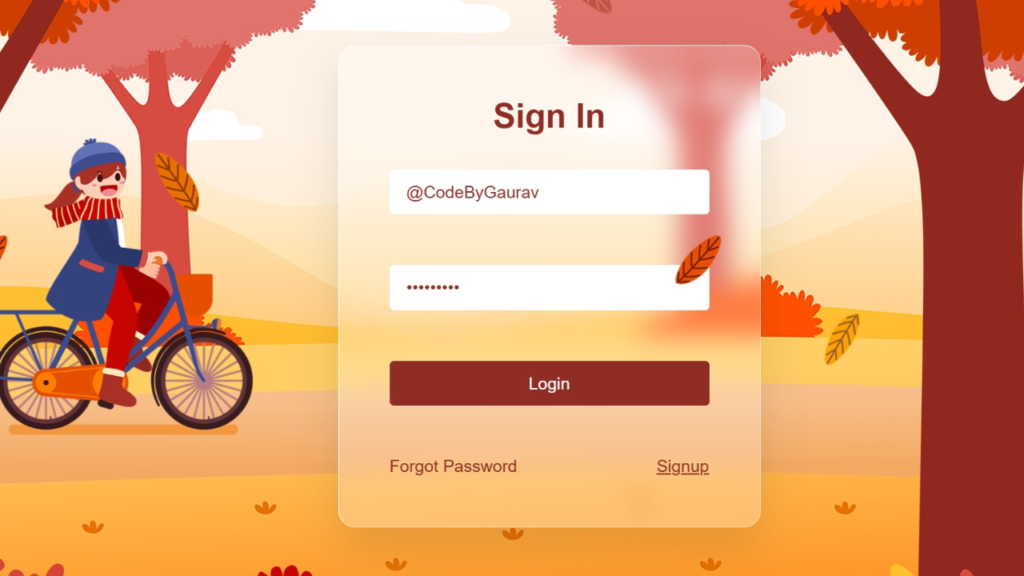
1. Video Tutorial – Glassmorphism Login Form
If you prefer visual learning, you can follow the complete video tutorial where the Glassmorphism Login Form is created step by step.
In the tutorial, you will learn:
HTML form structure
Creating glass effect using CSS
Applying blur and transparency
Adding smooth hover and focus effects
2. HTML Structure – Login Form Layout
The first step in creating the login form is building the structure using HTML. HTML provides the basic layout for the form elements such as input fields, labels, and buttons.
In this project, we create a container that holds the login form. Inside the form, we include input fields for the username and password along with a submit button.
The HTML structure is simple and organized, making it easy to apply CSS styling later.
The main elements included in the HTML structure are:
Login form container
Username input field
Password input field
Login button
This clean structure allows us to easily style the form using modern CSS techniques.
<!DOCTYPE html>
<html lang="en">
<head>
<meta charset="UTF-8">
<meta name="viewport" content="width=device-width, initial-scale=1.0">
<title>Glassmorphism Login Form | CodeByGaurav</title>
<link rel="stylesheet" href="style.css">
</head>
<body>
<section>
<div class="leaves">
<div class="set">
<div><img decoding="async" src="./images/leaf_01.png" alt="leaf 01 CodeByGaurav" title="leaf 01 Glassmorphism Login Form Using HTML & CSS"></div>
<div><img decoding="async" src="./images/leaf_02.png" alt="leaf 02 CodeByGaurav" title="leaf 02 Glassmorphism Login Form Using HTML & CSS"></div>
<div><img decoding="async" src="./images/leaf_03.png" alt="leaf 03 CodeByGaurav" title="leaf 03 Glassmorphism Login Form Using HTML & CSS"></div>
<div><img decoding="async" src="./images/leaf_04.png" alt="leaf 04 CodeByGaurav" title="leaf 04 Glassmorphism Login Form Using HTML & CSS"></div>
<div><img decoding="async" src="./images/leaf_01.png" alt="leaf 01 CodeByGaurav" title="leaf 01 Glassmorphism Login Form Using HTML & CSS"></div>
<div><img decoding="async" src="./images/leaf_02.png" alt="leaf 02 CodeByGaurav" title="leaf 02 Glassmorphism Login Form Using HTML & CSS"></div>
<div><img decoding="async" src="./images/leaf_03.png" alt="leaf 03 CodeByGaurav" title="leaf 03 Glassmorphism Login Form Using HTML & CSS"></div>
<div><img decoding="async" src="./images/leaf_04.png" alt="leaf 04 CodeByGaurav" title="leaf 04 Glassmorphism Login Form Using HTML & CSS"></div>
</div>
</div>
<img decoding="async" src="./images/bg.jpg" class="bg" alt="bg CodeByGaurav" title="bg Glassmorphism Login Form Using HTML & CSS">
<img decoding="async" src="./images/girl.png" class="girl" alt="girl CodeByGaurav" title="girl Glassmorphism Login Form Using HTML & CSS">
<img decoding="async" src="./images/trees.png" class="trees" alt="trees CodeByGaurav" title="trees Glassmorphism Login Form Using HTML & CSS">
<div class="login">
<h2>Sign In</h2>
<div class="inputBox">
<input type="text" placeholder="Username">
</div>
<div class="inputBox">
<input type="password" placeholder="Password">
</div>
<div class="inputBox">
<input type="submit" value="Login" id="btn">
</div>
<div class="group">
<a href="#">Forgot Password</a>
<a href="#">Signup</a>
</div>
</div>
</section>
</body>
</html>
3. CSS Styling – Creating the Glass Effect
CSS is the main part of this project. It is used to:
Apply transparent background using
rgba()Add
backdrop-filter: blur()for frosted effectCreate rounded corners with
border-radiusAdd subtle box-shadow
Apply hover and focus animations
Using a gradient or image background enhances the glass effect even more.
👇 Add your complete CSS code below this section.
					* {
    padding: 0;
    margin: 0;
    box-sizing: border-box;
    font-family: "Poppins", sans-serif;
}

section{
    position: relative;
    display: flex;
    justify-content: center;
    align-items: center;
    width: 100%;
    height: 100vh;
    overflow: hidden;
}

section .bg{
    position: absolute;
    top: 0;
    left: 0;
    width: 100%;
    height: 100%;
    object-fit: cover;
    pointer-events: none;
}

section .trees{
    position: absolute;
    top: 0;
    left: 0;
    width: 100%;
    height: 100%;
    object-fit: cover;
    z-index: 100;
    pointer-events: none;
}

section .girl{
    position: absolute;
    scale: 0.65;
    pointer-events: none;
    animation: animateGirl 10s linear infinite;
}

@keyframes animateGirl {
    0%{
        transform: translateX(calc(100% + 100vw));
    }
    50%{
        transform: translateX(calc(-100% - 100vw));
    }
    50.01%{
        transform: translateX(calc(-100% - 100vw)) rotateY(180deg);
    }
    100%{
        transform: translateX(calc(100% + 100vw)) rotateY(180deg);
    }
}

.login{
    position: relative;
    padding: 60px;
    background: rgba(255, 255, 255, 0.25);
    backdrop-filter: blur(15px);
    border: 1px solid #fff;
    border-bottom: 1px solid rgba(255, 255, 255, 0.5)
    ;
    border-right: 1px solid rgba(255, 255, 255, 0.5);
    border-radius: 20px;
    width: 500px;
    display: flex;
    flex-direction: column;
    gap: 30px;
    box-shadow: 0 25px 50px rgba(0, 0, 0, 0.1);
}

.login h2{
    position: relative;
    width: 100%;
    text-align: center;
    font-size: 2.5rem;
    font-weight: 600;
    color: #8f2c24;
    margin-bottom: 10px;
}

.login .inputBox{
    position: relative;
}

.login .inputBox input{
    position: relative;
    width: 100%;
    padding: 15px 20px;
    outline: none;
    font-size: 1.25rem;
    color: #8f2c24;
    border-radius: 5px;
    background: #fff;
    border: none;
    margin-bottom: 30px;
}

.login .inputBox ::placeholder{
    color: #8f2c24;
}

.login .inputBox #btn{
    position: relative;
    border: none;
    outline: none;
    background: #8f2c24;
    color: #fff;
    cursor: pointer;
    font-size: 1.25rem;
    font-weight: 500;
    transition: 0.5s;
}

.login .inputBox #btn:hover{
    background: #d64c42;
}

.login .group{
    display: flex;
    justify-content: space-between;
}

.login .group a{
    font-size: 1.25rem;
    color: #8f2c24;
    font-weight: 500;
    text-decoration: none;
}

.login .group a:nth-child(2){
    text-decoration: underline;
}

.leaves{
    position: absolute;
    width: 100%;
    height: 100vh;
    overflow: hidden;
    display: flex;
    justify-content: center;
    align-items: center;
    z-index: 1;
    pointer-events: none;

}

.leaves .set{
    position: absolute;
    width: 100%;
    height: 100%;
    top: 0;
    left: 0;
    pointer-events: none;
}

.leaves .set div{
    position: absolute;
    display: block;
}

.leaves .set div:nth-child(1){
    left: 20%;
    animation: animate 20s linear infinite;
}

.leaves .set div:nth-child(2){
    left: 50%;
    animation: animate 14s linear infinite;
}

.leaves .set div:nth-child(3){
    left: 70%;
    animation: animate 12s linear infinite;
}

.leaves .set div:nth-child(4){
    left: 5%;
    animation: animate 15s linear infinite;
}

.leaves .set div:nth-child(5){
    left: 85%;
    animation: animate 18s linear infinite;
}

.leaves .set div:nth-child(6){
    left: 90%;
    animation: animate 12s linear infinite;
}

.leaves .set div:nth-child(7){
    left: 15%;
    animation: animate 14s linear infinite;
}

.leaves .set div:nth-child(8){
    left: 60%;
    animation: animate 15s linear infinite;
}

@keyframes animate {
    0%{
        opacity: 0;
        top: -10%;
        transform: translateX(20px) rotate(0deg);
    }
    10%{
        opacity: 1;
    }
    20%{
        transform: translateX(-20px) rotate(45deg);
    }
    40%{
        transform: translateX(-20px) rotate(90deg);
    }
    60%{
        transform: translateX(20px) rotate(180deg);
    }
    80%{
        transform: translateX(-20px) rotate(45deg);
    }
    100%{
        top: 110%;
        transform: translateX(20px) rotate(255deg);
    }
}
4. Project Images – Download Resources
This project uses a background image to enhance the glassmorphism effect. A high-quality background helps create a better frosted glass appearance.
The image resources include:
Gradient background image
Optional abstract background
Preview screenshot of the final design
You can download the project images from the link provided below.
👇 Download the images from here:
👉 Download Project Images (ZIP File)
👉 Or Get Images from GitHub RepositoryAfter downloading, place the images inside your project folder (for example, inside an
imagesfolder) and link them correctly in your HTML or CSS file.
5. Key Features of This Glassmorphism Login Form
Modern frosted glass UI
Built using only HTML & CSS
Smooth hover and focus effects
Fully responsive layout
Beginner-friendly code
Conclusion
In this tutorial, you learned how to create a Glassmorphism Login Form using HTML and CSS. This modern UI design trend helps make your website look clean, elegant, and professional.
You can enhance this project further by adding:
Floating labels
Dark and light theme toggle
Animated background
Social login buttons
Practicing UI components like this will significantly improve your frontend design skills.
For more modern HTML & CSS UI projects, keep building and experimenting 🚀

Volwassen inhoud streamen op veilige en betrouwbare platforms.
Vind gegarandeerde videobronnen voor een premium ervaring.
my site: BUY XANAX ONLINE
Thank you for your comment. This website focuses only on educational and informative content
It’s amazing in favor of me to have a website, which is useful
in support of my know-how. thanks admin
my page; BUY CANNABIS ONLINE
Thank you so much 😊
I’m really glad the website is helpful for your learning.
Your support and feedback truly mean a lot!
Pingback: Build an Age Calculator Using HTML CSS and JavaScript (Beginner Friendly Project) - CodeByGaurav
Pingback: Responsive Footer Design using HTML & CSS (Beginner Friendly Tutorial) - CodeByGaurav
It’s going to be finish of mine day, however before ending I
am reading this wonderful article to improve my knowledge.